

KOM GODT I GANG MED BALANCE Full-Size Keyboard, KABLET
Tillykke med dit nye tastatur!
Brug et øjeblik på at tjekke vores opsætningstips - og du er i gang på ingen tid.
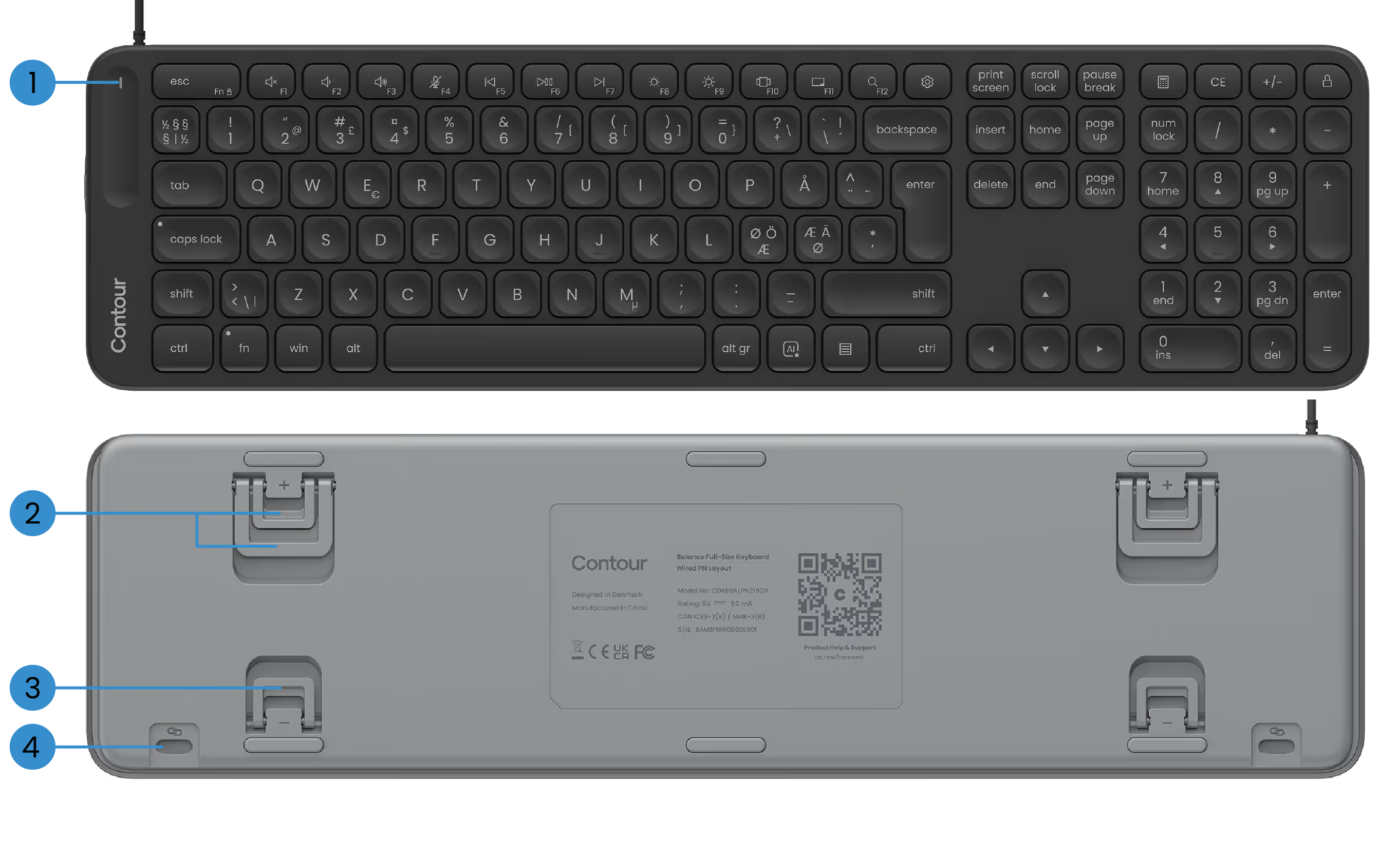
GRUNDLÆGGENDE FUNKTIONER
1) Power LED
2) Positive vippeben
3) Negative vippeben
4) SnapLink vedlagt

OPSÆTNING AF DIT BALANCE Keyboard
1. Tilslutning
Tilslut blot USB-kablet til en tilgængelig USB-port på din pc. Dit tastatur opretter automatisk forbindelse til computeren. Ingen ekstra trin er nødvendige.
Kablet leveres med en forudinstalleret USB-A-adapter. Foretrækker du USB-C? Skub bare adapteren ud og tilslut USB-C-stikket i stedet.
2. Opsætning
Hvis du bruger ContourTouch: Stil H-tasten og midten af touchpad'en sammen med skærmen og kroppen. Dette hjælper med at holde din kropsholdning naturlig og afbalanceret.
Placer tastaturet tæt på touchpad'en, og hold Contour Touch langt nok fra skrivebordets kant, så dine underarme understøttes, når du hviler.
Hvis du bruger RollerMouse eller SliderMouse: Stil H-tasten på dit tastatur og rullehjulet på din RollerMouse eller SliderMouse op med midten af din skærm og krop. Placer tastaturet tæt på rullestangen, og hold RollerMouse eller SliderMouse langt nok fra bordkanten, så dine underarme understøttes, når du hviler.
For at arbejde komfortabelt med din RollerMouse eller SliderMouse skal du hæve frontkanten af tastaturet ved at vende de negative vippeben ud. Brug lidt tid på at finde den hældningsvinkel, der føles bedst for dig.
Når du arbejder, skal du huske at slappe af dine skuldre. Hold albuerne på 90 grader tæt på din krop. Dine underarme skal være parallelle med gulvet, med håndled i en lige, neutral position.
3. Det er det...
Du er klar.
Når du har fundet dig til rette med tastaturet, kan det være en god idé at udforske flere tilpasningsmuligheder i vores software - f.eks. opsætning af brugerdefinerede medietaster, oprettelse af appspecifikke genveje og meget mere.
Drivers
Giv din Contour-enhed den nyeste dosis komfort og kontrol. Download den nyeste driver for at låse op for nye funktioner, jævnere ydeevne og bekymringsfri kompatibilitet med blot et par klik.
Produktmanualer
Har du brug for en hurtig start eller et dybere dyk? Tag fat i manualen til din enhed, og gå igennem opsætning, personalisering og pleje — alt hvad du behøver for at blive ved med at føle dig godt tilpas, mens du udfører mirakler.