

PREMIERS PAS AVEC LE CLAVIER COMPLET BALANCE WIRED
Félicitations pour ton nouveau clavier !
Prenez un moment pour consulter nos conseils de configuration et vous serez opérationnel en un rien de temps.
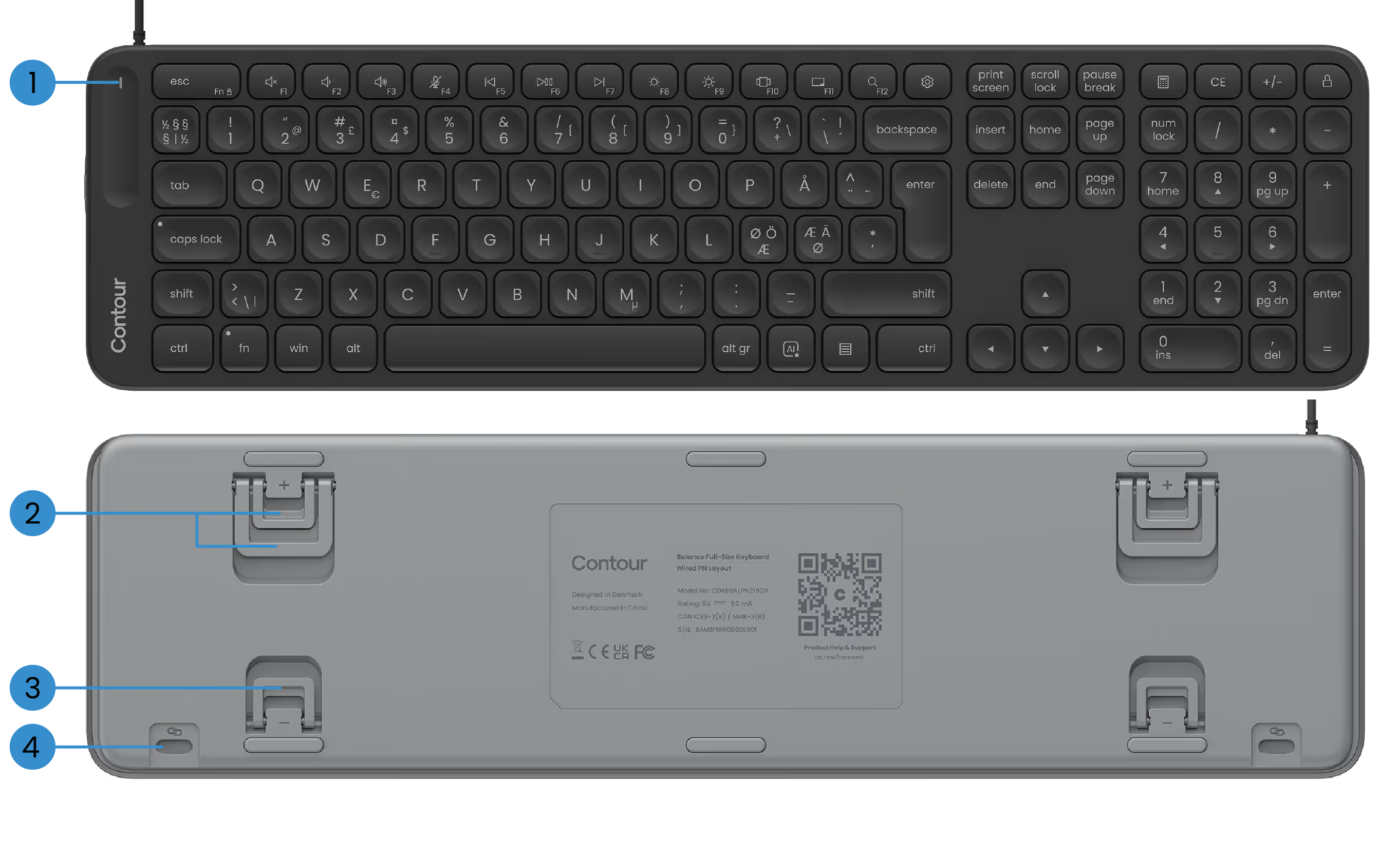
FONCTIONS DE BASE
1) LED d'alimentation
2) Pieds à inclinaison positive
3) Pieds à inclinaison négative
4) Pièces jointes SnapLink

CONFIGURATION DE VOTRE CLAVIER D'ÉQUILIBRE
1. Connecter
Il suffit de brancher le câble USB sur n'importe quel port USB disponible de votre PC. Votre clavier se connectera automatiquement à l'ordinateur. Aucune étape supplémentaire n'est nécessaire.
Le câble est livré avec un adaptateur USB-A préinstallé. Vous préférez l'USB-C ? Il vous suffit de retirer l'adaptateur et de brancher le connecteur USB-C à la place.
2. Configuration
Si vous utilisez ContourTouch : alignez la touche H et le centre du pavé tactile avec votre écran et votre boîtier. Cela permet de garder une posture naturelle et équilibrée.
Placez le clavier à proximité du pavé tactile et maintenez le Contour Touch suffisamment éloigné du bord du bureau pour soutenir vos avant-bras lorsque vous vous reposez.
Si vous utilisez RollerMouse ou SliderMouse : alignez la touche H de votre clavier et la molette de défilement de votre RollerMouse ou SliderMouse au centre de votre écran et de votre boîtier. Placez le clavier à proximité du rollerbar et maintenez la RollerMouse ou la SliderMouse suffisamment loin du bord du bureau pour que vos avant-bras soient soutenus lorsque vous vous reposez.
Pour travailler confortablement avec votre RollerMouse ou SliderMouse, soulevez le bord avant de votre clavier en rabattant les pieds à inclinaison négative. Prenez le temps de trouver l'angle d'inclinaison qui vous convient le mieux.
Lorsque vous travaillez, n'oubliez pas de détendre vos épaules. Gardez vos coudes à 90 degrés, près de votre corps. Vos avant-bras doivent être parallèles au sol, les poignets en position droite et neutre.
3. C'est ça...
Tu es prête à partir.
Une fois que vous aurez configuré votre clavier, vous souhaiterez peut-être explorer d'autres options de personnalisation dans notre logiciel, telles que la configuration de touches multimédia personnalisées, la création de raccourcis spécifiques à une application, etc.
Pilotes
Offrez à votre appareil Contour la dernière dose de confort et de contrôle. Téléchargez le pilote le plus récent pour accéder à de nouvelles fonctionnalités, à des performances plus fluides et à une compatibilité sans souci en quelques clics.
Manuels des produits
Vous avez besoin d'un démarrage rapide ou d'une plongée plus approfondie ? Accédez au manuel de votre appareil et procédez à la configuration, à la personnalisation et à l'entretien en toute simplicité : tout ce dont vous avez besoin pour continuer à vous sentir bien tout en faisant des miracles.