

BALANCE TÄYSIKOKOISEN NÄPPÄIMISTÖN WIRED-KÄYTÖN ALOIT
Onnittelut uudesta näppäimistöstä!
Käytä hetki ja tutustu asennusvinkkeihimme - niin pääset nopeasti käyntiin.
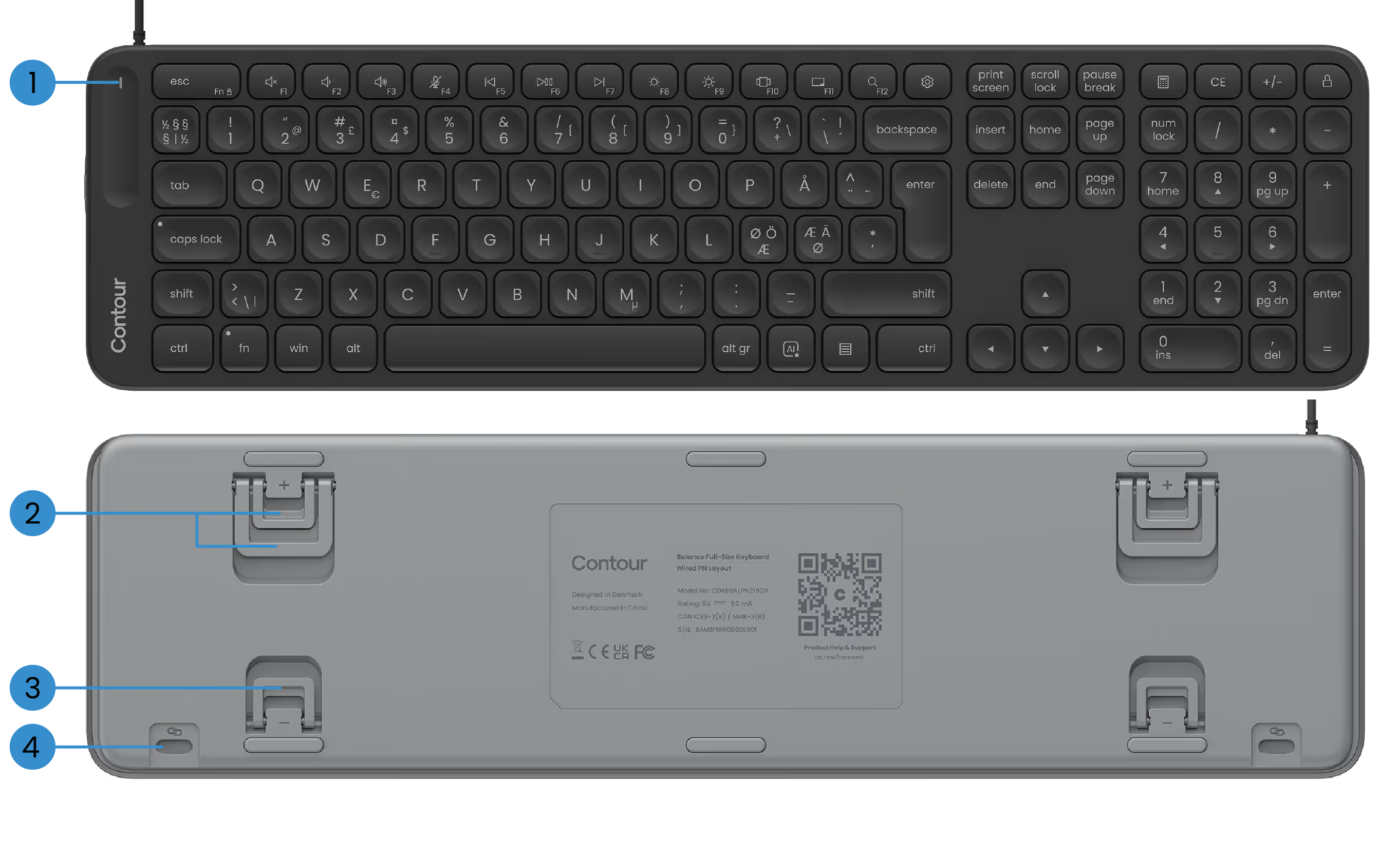
PERUSTOIMINNOT
1) Virta-LED
2) Positiiviset kallistusjalat
3) Negatiiviset kallistusjalat
4) SnapLink-liitteet

TASAPAINONÄPPÄIMISTÖN MÄÄRITTÄMINEN
1. Yhdistäminen
Liitä USB-kaapeli mihin tahansa käytettävissä olevaan USB-porttiin tietokoneessa. Näppäimistö muodostaa yhteyden tietokoneeseen automaattisesti. Ylimääräisiä vaiheita ei tarvita.
Kaapelin mukana tulee valmiiksi asennettu USB-A-sovitin. Haluatko USB-C: n? Liu'uta vain sovitin pois ja kytke sen sijaan USB-C-liitin.
2. Asennus
Jos käytät ContourTouchia: Kohdista H-näppäin ja kosketuslevyn keskiosa näytön ja rungon kanssa. Tämä auttaa pitämään asennon luonnollisena ja tasapainoisena.
Aseta näppäimistö kosketuslevyn lähelle ja pidä Contour Touch riittävän kaukana pöydän reunasta, jotta kyynärvarret tuetaan lepotilassa.
Jos käytät RollerMousea tai SliderMousea: Kohdista näppäimistön H-näppäin ja RollerMouse- tai SliderMouse-vierityspyörä näytön ja rungon keskelle. Aseta näppäimistö lähelle rullatankoa ja pidä RollerMouse- tai SliderMouse riittävän kaukana pöydän reunasta, jotta kyynärvarret tuetaan lepotilassa.
Voit työskennellä mukavasti RollerMousen tai SliderMousen kanssa nostamalla näppäimistön etureunaa kääntämällä negatiiviset kallistusjalat ulos. Vietä aikaa löytääksesi kallistuskulman, joka tuntuu sinulle parhaiten.
Kun työskentelet, muista rentoutua hartiat. Pidä kyynärpäät 90 asteessa lähellä vartaloasi. Kyynärvarsien tulee olla yhdensuuntaiset lattian kanssa, ranteet suorassa, neutraalissa asennossa.
3. Siinäpä se...
Olet valmis lähtemään.
Kun olet sopinut näppäimistön käyttöön, sinun kannattaa tutustua ohjelmistomme mukauttamisvaihtoehtoihin, kuten mukautettujen medianäppäinten määrittämiseen, sovelluskohtaisten pikakuvakkeiden luomiseen ja muihin.
AJURIT
Anna Contour-laitteellesi uusin annos mukavuutta ja hallintaa. Lataa uusin ohjain, niin saat käyttöösi uusia ominaisuuksia, sujuvampaa suorituskykyä ja huoletonta yhteensopivuutta vain muutamalla napsautuksella.
Tuoteoppaat
Tarvitsetko nopean alun tai syvemmän sukelluksen? Tartu laitteesi käyttöoppaaseen ja tutustu käyttöönottoon, mukauttamiseen ja hoitoon — kaikki mitä tarvitset voidaksesi tuntea olosi hyväksi tehdessäsi ihmeitä.