

KOMMA IGÅNG MED BALANCE TANGENTBORD I FULL STORLEK WIRED
Grattis till ditt nya tangentbord!
Ta en stund och kolla in våra installationstips - så är du igång på nolltid.
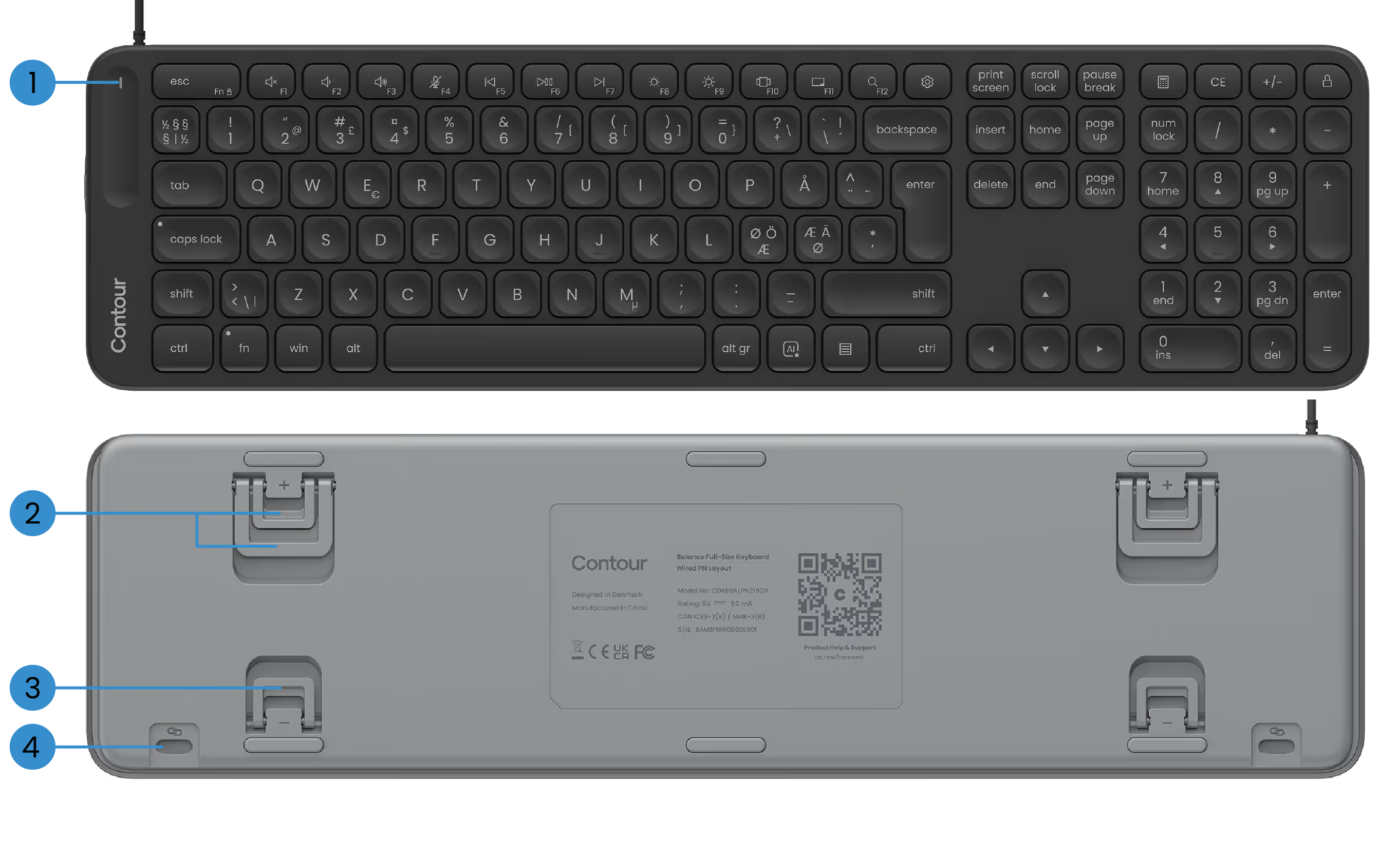
GRUNDLÄGGANDE FUNKTIONER
1) Strömlampa
2) Positiva lutningsben
3) Negativa lutningsben
4) SnapLink-tillbehör

STÄLLA IN DITT BALANSTANGENTBORD
1. Anslutande
Anslut bara USB-kabeln till någon tillgänglig USB-port i din dator. Tangentbordet ansluts automatiskt till datorn. Inga extra steg behövs.
Kabeln levereras med en förinstallerad USB-A-adapter. Föredrar du USB-C? Skjut bara av adaptern och anslut USB-C-kontakten istället.
2. Ställa in
Om du använder ContourTouch: Rikta upp H-tangenten och mitten av pekplattan med bildskärmen och kroppen. Detta hjälper till att hålla din hållning naturlig och balanserad.
Placera tangentbordet nära pekplattan och håll Contour Touch tillräckligt långt från skrivbordskanten så att underarmarna stöds när du vilar.
Om du använder RollerMouse eller SliderMouse: Rikta upp H-tangenten på tangentbordet och rullningshjulet på RollerMouse eller SliderMouse med mitten av skärmen och kroppen. Placera tangentbordet nära rullstången och håll RollerMouse eller SliderMouse tillräckligt långt från skrivbordskanten så att underarmarna stöds när du vilar.
För att arbeta bekvämt med din RollerMouse eller SliderMouse höjer du tangentbordets framkant genom att vända ut de negativa lutningsbenen. Spendera lite tid på att hitta den lutningsvinkel som känns bäst för dig.
Kom ihåg att slappna av axlarna när du arbetar. Håll armbågarna på 90 grader, nära kroppen. Dina underarmar ska vara parallella med golvet, med handlederna i rak, neutral position.
3. Det är det...
Du är redo att gå.
När du väl har bestämt dig för tangentbordet kanske du vill utforska fler anpassningsalternativ i vår programvara - som att ställa in anpassade medietangenter, skapa appspecifika genvägar och mer.
Drivrutiner
Ge din Contour-enhet den senaste dosen av komfort och kontroll. Ladda ner den senaste drivrutinen för att låsa upp nya funktioner, jämnare prestanda, och bekymmersfri kompatibilitet med bara ett par klick.
Produkthandböcker
Behöver du en snabb start eller ett djupare dyk? Ta tag i manualen för din enhet och gå igenom installation, personalisering och skötsel — allt du behöver för att fortsätta må bra när du gör mirakel.