

ERSTE SCHRITTE MIT BALANCE FULL-SIZE KEYBOARD WIRED
Herzlichen Glückwunsch zu deiner neuen Tastatur!
Nehmen Sie sich einen Moment Zeit, um unsere Einrichtungstipps zu lesen — und Sie sind im Handumdrehen einsatzbereit.
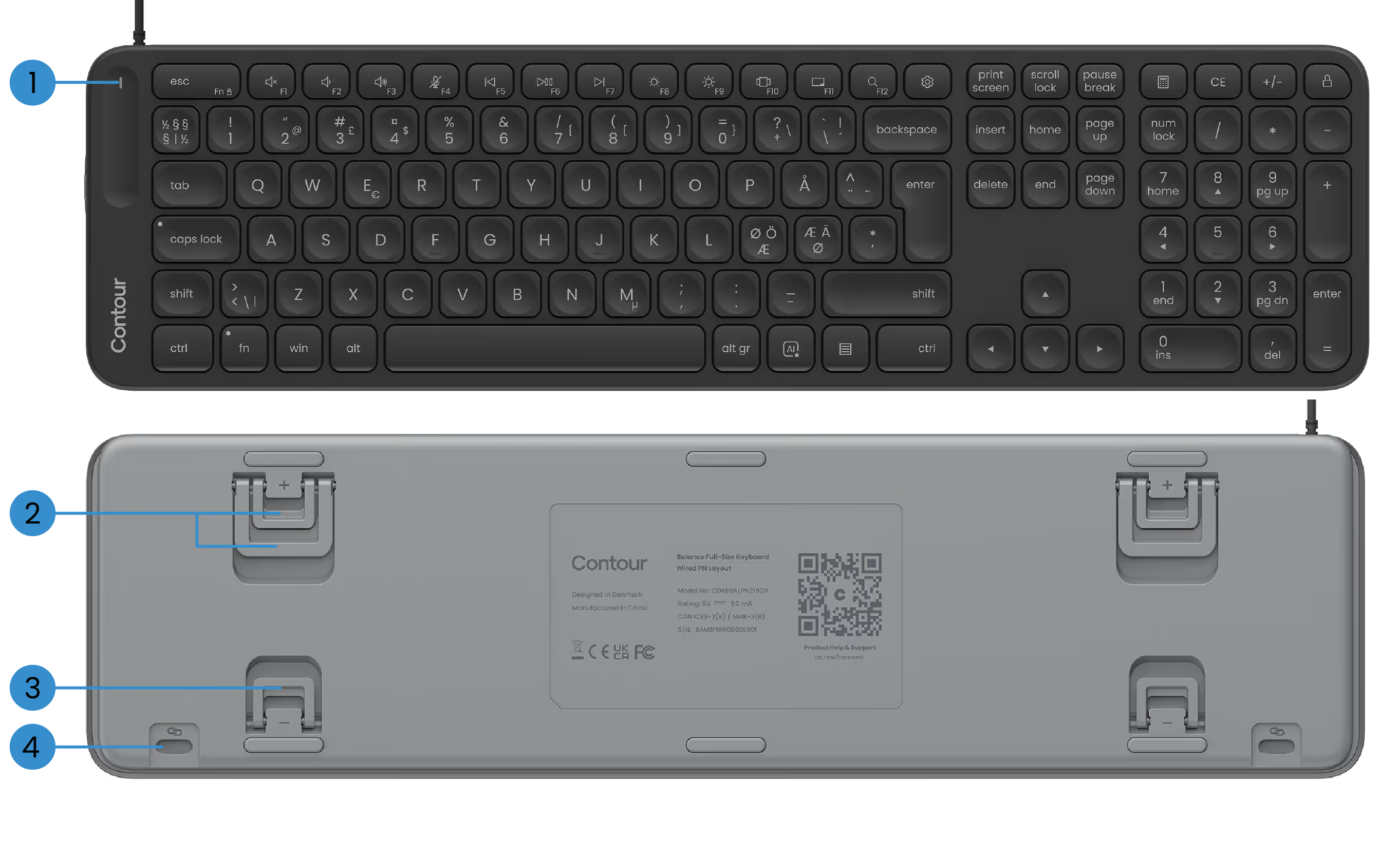
GRUNDLEGENDE FUNKTIONEN
1) Betriebs-LED
2) Positiv geneigte Beine
3) Beine mit negativer Neigung
4) SnapLink-Anhänge

DEINE BALANCETASTATUR EINRICHTEN
1. Verbindung herstellen
Stecken Sie das USB-Kabel einfach in einen verfügbaren USB-Anschluss Ihres PCs. Ihre Tastatur wird automatisch mit dem Computer verbunden. Es sind keine zusätzlichen Schritte erforderlich.
Das Kabel wird mit einem vorinstallierten USB-A-Adapter geliefert. Bevorzugen Sie USB-C? Ziehen Sie einfach den Adapter ab und stecken Sie stattdessen den USB-C-Anschluss ein.
2. Einrichten
Wenn Sie ContourTouch verwenden: Richten Sie die H-Taste und die Mitte des Touchpads auf den Monitor und das Gehäuse aus. Dies hilft, Ihre Körperhaltung natürlich und ausgewogen zu halten.
Positionieren Sie die Tastatur in der Nähe des Touchpads und halten Sie den Contour Touch so weit von der Tischkante entfernt, dass Ihre Unterarme beim Ausruhen gestützt werden.
Wenn Sie RollerMouse oder SliderMouse verwenden: Richten Sie die H-Taste auf Ihrer Tastatur und das Scrollrad auf Ihrer RollerMouse oder SliderMouse so aus, dass sie in der Mitte Ihres Monitors und Ihres Gehäuses liegen. Positionieren Sie die Tastatur in der Nähe des Rollerbars und halten Sie die RollerMouse oder SliderMouse so weit von der Tischkante entfernt, dass Ihre Unterarme gestützt werden, wenn Sie sich ausruhen.
Um bequem mit Ihrer RollerMouse oder SliderMouse zu arbeiten, heben Sie die Vorderkante Ihrer Tastatur an, indem Sie die negativ geneigten Beine ausklappen. Nehmen Sie sich etwas Zeit, um den Neigungswinkel zu finden, der sich für Sie am besten anfühlt.
Denken Sie bei der Arbeit daran, Ihre Schultern zu entspannen. Halten Sie Ihre Ellbogen bei 90 Grad in der Nähe Ihres Körpers. Ihre Unterarme sollten parallel zum Boden sein und die Handgelenke sollten sich in einer geraden, neutralen Position befinden.
3. Das ist es...
Du bist bereit zu gehen.
Sobald Sie sich mit Ihrer Tastatur vertraut gemacht haben, möchten Sie vielleicht weitere Anpassungsoptionen in unserer Software ausprobieren, z. B. das Einrichten benutzerdefinierter Medientasten, das Erstellen von appspezifischen Tastenkombinationen und mehr.
Fahrer
Verleihen Sie Ihrem Contour-Gerät die neueste Dosis an Komfort und Kontrolle. Laden Sie den neuesten Treiber herunter, um mit nur wenigen Klicks neue Funktionen, eine reibungslosere Leistung und problemlose Kompatibilität zu nutzen.
Anleitungen zum Produkt
Brauchen Sie einen schnellen Einstieg oder einen tieferen Einblick? Schnappen Sie sich das Handbuch für Ihr Gerät und machen Sie sich im Handumdrehen mit der Einrichtung, Personalisierung und Pflege vertraut — alles, was Sie brauchen, um sich immer großartig zu fühlen, während Sie Wunder vollbringen.