

Beste Maus bei Ulnaris-Schmerzen: 7 ergonomische Empfehlungen für zentrierte Kontrolle und dauerhafte Linderung
Ihr kleiner Finger beginnt am frühen Nachmittag zu kribbeln. Sie machen kurz Pause, schütteln die Hand aus und hoffen, dass das Gefühl vor dem nächsten Meeting nachlässt. Doch das vertraute Brennen zieht trotzdem entlang der ulnaren Seite Ihres Unterarms – eine leise Erinnerung daran, dass Ihr Setup Ihr Handgelenk öfter verdrehen, ausstrecken und fester greifen lässt, als es sollte. Wenn das Ihr Alltag ist: Sie bilden sich das nicht ein. Eine Reizung des Ulnarnervs wird durch kleine, wiederholte Bewegungen begünstigt, die Ihr Handgelenk in ungünstige Winkel zwingen.
Die gute Nachricht? Die beste Maus bei Ulnarnerv-Schmerzen unterbricht genau diese Winkel. Sie hält Ihr Handgelenk neutral, bringt die Kontrolle näher heran und reduziert den Kraftaufwand Ihrer Hand bei jedem Klick. Und mit Contour Devices® – den Entwicklern der originalen, zentrierten RollerMouse – können Sie sich von Belastung weg und hin zu einer gesünderen Arbeitsweise bewegen. Hier erfahren Sie, wie jede ergonomische Kategorie hilft – plus die praktischen Details, die den Unterschied machen.
1. Zentrierte Roller-Maus: kein Greifen zur Seite, minimale Ulnardeviation

Warum sie bei Ulnarnerv-Schmerzen hilft
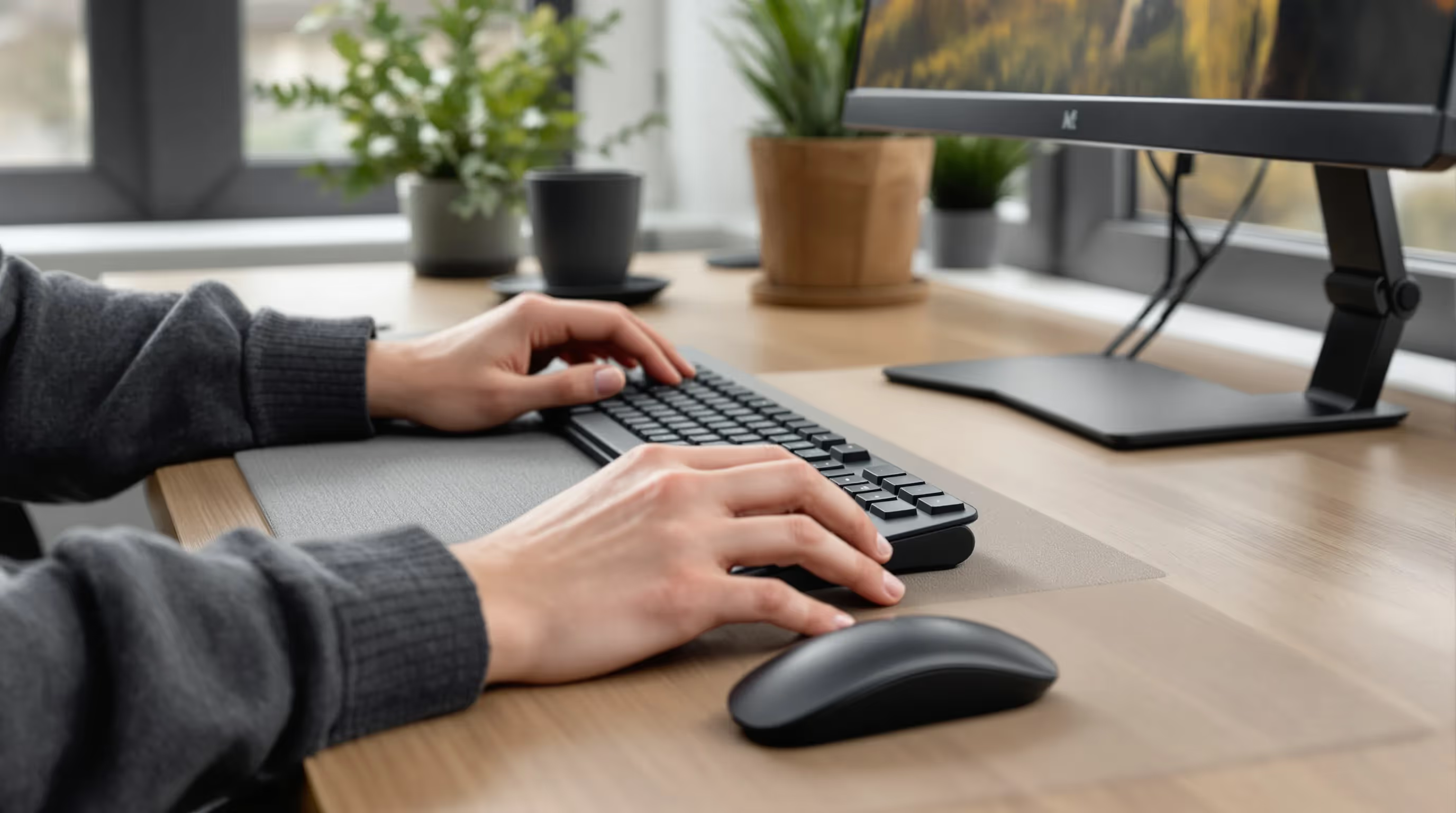
Eine zentrierte RollerMouse bringt Zeigen, Klicken und Scrollen in Ihre Körpermitte – so müssen Sie nicht nach außen greifen und haben nahezu keine Ulnardeviation (die Einwärtsknickung, die den Ulnarnerv komprimieren kann). Die Rollleiste gleitet mit winzigen Fingerbewegungen: weniger Bewegung, weniger Belastung. Da beide Hände die Eingabe teilen können, verteilt sich die Last auf Schultern und Unterarme – und der Druck auf die ulnare Seite nimmt ab.
Die RollerMouse-Familie von Contour Design steht genau für diesen Ansatz: ein schlankes, stationäres Gehäuse unter der Tastatur mit einer taktilen Rollleiste für präzise, kraftarme Steuerung. Viele Nutzer*innen mit RSI an Handgelenk, Ellbogen, Schulter oder Nacken erleben zentrierte Kontrolle als besonders entlastend, weil sie die Ursache entfernt: das Greifen zur Seite.
Am besten geeignet für
- Moderate bis fortgeschrittene RSI- oder Nervenkompressionssymptome.
- Alle, bei denen die Schmerzen zunehmen, wenn die Maus seitlich liegt.
- Sitz-Steh-Setups, bei denen eine zentrierte Haltung entscheidend ist.
Setup-Tipps für maximale Entlastung
- Platzieren Sie die RollerMouse direkt vor sich, ausgerichtet auf Bauchnabel und Schultern.
- Halten Sie die Ellbogen bei etwa 90 Grad: Unterarme parallel zur Tischplatte: Handgelenke flach und neutral.
- Kombinieren Sie sie mit einer flachen Tastatur wie der Balance Keyboard, damit die Tasten nah bleiben und die Rollleiste in kurzer, neutraler Reichweite liegt.
- Starten Sie mit einer langsameren Cursor-Geschwindigkeit für mehr Kontrolle und erhöhen Sie dann schrittweise, sobald die Präzision sitzt.

2. Verstellbare vertikale Maus: Winkel und Daumenauflage fein einstellen
Warum sie bei Ulnarnerv-Schmerzen hilft
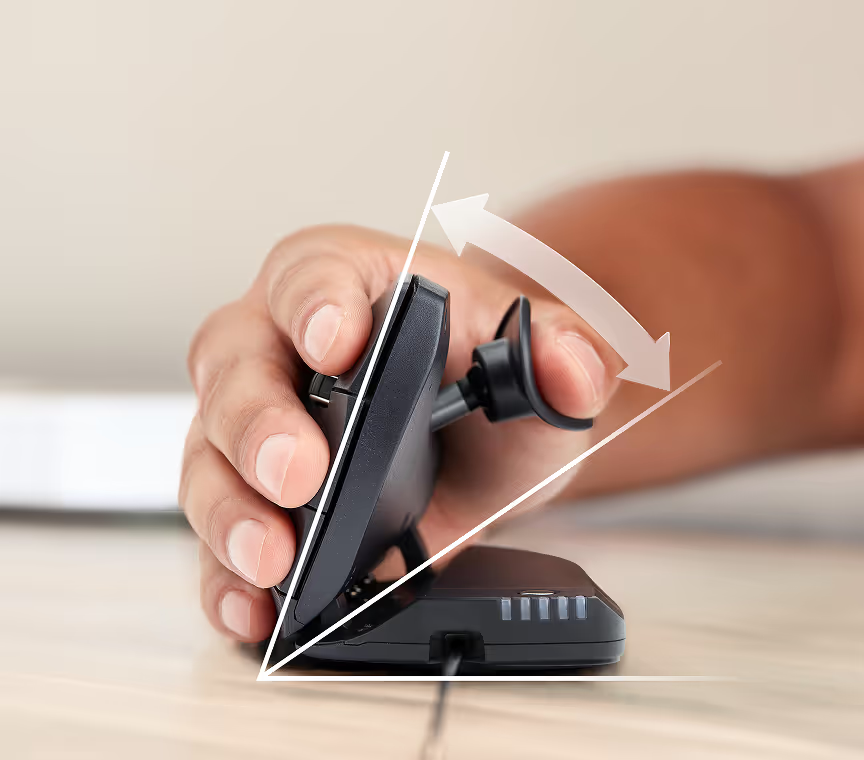
Eine vertikale Maus dreht den Unterarm in eine „Handshake“-Position. Das reduziert Pronation und den Einwärtsknick im Handgelenk, der den Ulnarnerv reizen kann. Verstellbare Modelle lassen Sie sowohl den Neigungswinkel als auch die Daumenauflage einstellen – so können Sie Druckpunkte gezielt minimieren und verhindern, dass das Handgelenk Richtung Tisch „einsackt“.
Die Contour Unimouse ist dafür gemacht: 35°–70° verstellbare Neigung plus eine verschiebbare, drehbare Daumenauflage, die sich an Handgröße und Griff anpasst. Diese Passform hilft, die neutrale Ausrichtung zu halten, statt das Handgelenk an eine feste Form anzupassen.
Am besten geeignet für
- Leichte bis moderate Ulnarnerv-Beschwerden, bei denen kleine Anpassungen viel bewirken.
- Nutzer*innen, die einen Arbeitsplatz teilen oder den Griff über den Tag variieren.
- Präzisionsarbeit, bei der Geschwindigkeit und Winkel justiert werden sollen.
Lesen Sie mehr darüber, warum eine vertikale Maus das Upgrade ist, das Sie brauchen
Passform- und Einstellhilfe
- Stellen Sie den Winkel so ein, dass sich Ihr Unterarm entspannt anfühlt – nicht komplett vertikal und nicht flach; meist wirkt ein Mittelbereich am natürlichsten.
- Justieren Sie die Daumenauflage so, dass der Daumen wirklich aufliegt statt „zu schweben“: kein Einwärtskollaps im Handgelenk.
- Legen Sie häufige Klicks auf leichtgängige Tasten und bauen Sie kurze Pausen für Mikro-Dehnungen ein.
- Es gibt Alternativen (z. B. Logitech MX Vertical), aber priorisieren Sie echte Verstellbarkeit und eine unterstützende Daumenauflage.
3. Vertikale Maus mit festem Winkel: simpel, stabil und budgetfreundlich
Warum sie bei Ulnarnerv-Schmerzen hilft
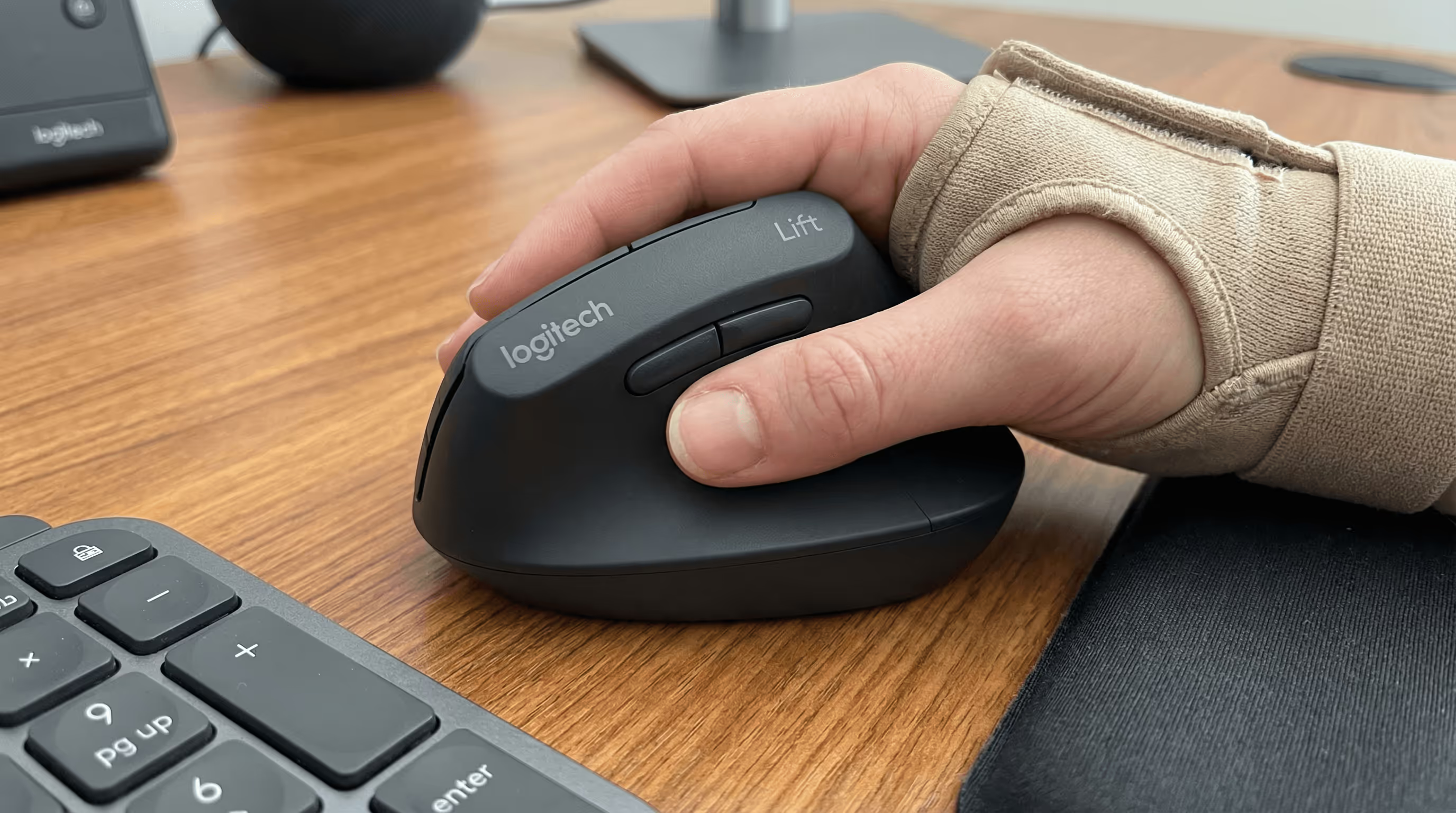
Vertikale Mäuse mit festem Winkel halten Sie in einer konstanten Neigung (oft um 57°). Diese Konstanz verhindert die Handflächen-nach-unten-Drehung und Ulnardeviation, die den Nerv belasten. Mit weniger beweglichen Teilen sind sie leicht zu nutzen und oft günstiger – ideal, wenn Sie die vertikale Handhaltung erstmals testen.
Am besten geeignet für
- Preisbewusste Käufer*innen oder Homeoffice.
- Kleinere Hände, die in kompakte vertikale Formen gut passen.
- Alle, die Plug-and-play-Entlastung ohne Einstellungen möchten.
Worauf Sie vor dem Kauf achten sollten
- Passende Größe: Die Handfläche sollte vollständig aufliegen; die Finger sollten locker „fallen“, nicht strecken.
- Daumenführung: Die Rille soll führen, nicht das Handgelenk nach innen zwingen.
- Tastenwiderstand: Leichtere Klicks helfen, seitlichen Druck auf die ulnare Kante zu vermeiden.
- Beispiele sind Logitech Lift für kleinere Hände. Wenn Sie später mehr Feintuning möchten, wechseln Sie zu einem verstellbaren Modell wie Unimouse.
4. Trackball-Maus: stationäre Kontrolle reduziert Reichweite und Belastung

Warum sie bei Ulnarnerv-Schmerzen hilft
Trackballs halten Ihre Hand „geparkt“, während sich der Cursor bewegt – das reduziert wiederholtes Greifen und seitliche Belastung am Handgelenk. Mit entspanntem Arm und neutralem Handgelenk bekommt die ulnare Seite eine Pause. Weniger Weg bedeutet oft auch weniger Schulterhochziehen – ein Faktor, der häufig mit ulnarer Reizung zusammen auftritt.
Finger- vs. Daumen-Trackballs
- Fingerbediente Modelle (z. B. Kensington Orbit Fusion) verteilen die Arbeit auf Zeige- und Mittelfinger – hilfreich, wenn Daumen oder ulnare Seite empfindlich sind.
- Daumenbediente Modelle halten die Hand ruhig, konzentrieren die Bewegung aber auf den Daumen – manchmal gut, wenn Ring-/Kleinfingerseite reagiert, aber vermeiden, wenn der Daumen bereits überlastet ist.
Lernkurve und Platzierung
- Rechnen Sie mit ein bis zwei Tagen, bis sich die Präzision wieder natürlich anfühlt. Starten Sie mit niedrigerer Zeigergeschwindigkeit.
- Platzieren Sie das Gerät nah am Körper und möglichst mittig: Handgelenk neutral „schwebend“, nicht in die Tischkante gedrückt.
- Reinigen Sie die Kugel wöchentlich, damit die Reibung gering bleibt und nur minimale Kräfte nötig sind.
5. Stift-Maus oder Grafiktablett: Präzision mit neutralem Handgelenk
Warum es bei Ulnarnerv-Schmerzen hilft
Ein Stiftgriff ähnelt Handschrift – dadurch „stapelt“ sich das Handgelenk natürlicher und Ulnardeviation sowie Pronation nehmen ab. Tablets ersetzen wiederholte Klicks zudem durch leichte Taps oder Druckgesten und senken so die Gesamtbelastung.
Am besten geeignet für
- Designerinnen, Editorinnen und alle, die den ganzen Tag mit Präzisions-Tools arbeiten.
- Nutzer*innen, die ohnehin skizzieren oder annotieren und eine vertraute Bewegung bevorzugen.
Hinweise und Setup-Tipps
- Nutzen Sie einen entspannten Drei-Punkt-Griff: Wenn die Knöchel weiß werden, greifen Sie zu fest.
- Stützen Sie den Unterarm auf dem Tisch oder einer weichen Unterarmauflage ab: vermeiden Sie das Aufliegen auf der ulnaren Kante.
- Stellen Sie Doppeltipp-Geschwindigkeit und Druckempfindlichkeit niedrig ein, um Kraft zu sparen.
- Wechseln Sie mit einem zentrierten Gerät (z. B. RollerMouse), um Gewebe zu variieren und Überlastung in einem Muster zu vermeiden.
6. Ergonomisches Touchpad oder zentrierte Touch-Lösung: flüssige, kraftarme Gesten
Warum es bei Ulnarnerv-Schmerzen hilft
Ein Touchpad in der Körpermitte reduziert seitliches Greifen und fördert leichte, flüssige Gesten. Weil Taps und Zwei-Finger-Scroll sehr wenig Kraft benötigen, wird die ulnare Kante nicht dauerhaft komprimiert. Contour Touch lädt zudem zur beidhändigen Nutzung ein – das balanciert die Belastung.
Am besten geeignet für
- Leichte, gestenbasierte Workflows (Browser, Dokumente, Meetings).
- Nutzer*innen, die minimale Klickkraft und nahtloses Scrollen bevorzugen.
Gesten-Einstellungen und Empfindlichkeit
- Erhöhen Sie die Zeigerempfindlichkeit, damit kleine Bewegungen weiter reichen: weniger Druck, mehr Kontrolle.
- Aktivieren Sie Tap-to-click und Einhand-Gesten: deaktivieren Sie harte Klicks durch Druck, wenn sie Schmerzen auslösen.
- Platzieren Sie das Gerät direkt vor der Leertaste. Wenn Sie eine RollerMouse nutzen, legen Sie die Tastatur auf die integrierte Plattform, damit alles ausgerichtet und nah bleibt.
7. Kompakte und Linkshand-Optionen: Seiten wechseln, Reichweite verkürzen
Warum das bei Ulnarnerv-Schmerzen hilft
Wenn Sie die Seite wechseln, verteilt sich die Arbeit auf beide Arme – der gereizte Nerv bekommt Zeit, sich zu beruhigen. Eine kompakte Maus verkürzt außerdem die Reichweite, sodass die Schulter unten bleibt und das Handgelenk gerade – kleine Änderungen mit großer Wirkung auf die ulnare Seite.
Wer die Hand wechseln sollte
- Einseitige Beschwerden: Wenn der Schmerz nur auf einer Seite sitzt, wechseln Sie gelegentlich zur anderen.
- Steigern Sie langsam: zuerst Navigation, dann Präzisionsaufgaben, sobald sich die Koordination verbessert.
- Beidhändige Modelle (z. B. Razer Pro Click Mini) erleichtern den Seitenwechsel: zentrierte Geräte wie RollerMouse sind von Natur aus beidhändig nutzbar.
Größe, Handballenauflagen und Schreibtischlayout
- Wählen Sie eine Nummer kleiner, damit das Gerät nah an der Tastatur liegt: kein Schulterhochziehen.
- Nutzen Sie eine Handballenauflage, um nicht auf der ulnaren Kante zu liegen: Handgelenke gerade, nicht abgeknickt.
- Spiegeln Sie Ihr Setup links und rechts: gleicher Abstand, gleicher Winkel, gleiche Kabelfreiheit. Konstanz verhindert neue „Hotspots“.
Fazit
Die beste Maus bei Ulnarnerv-Schmerzen hält Sie zentriert, gut ausgerichtet und bei geringem Kraftaufwand. Wenn die Symptome moderat sind oder zusätzlich Nacken-/Schulterschmerzen mitspielen, starten Sie mit einer zentrierten RollerMouse, um das Greifen zur Seite komplett zu eliminieren. Wenn Sie traditionelles Zeigen brauchen, probieren Sie eine verstellbare vertikale Maus wie Unimouse und stellen Winkel sowie Daumenauflage passend ein. Vertikale Mäuse mit festem Winkel, Trackballs, Touchpads, Stift-Tablets und kompakte beidhändige Optionen haben jeweils ihren Platz – wählen Sie passend zu Aufgaben und Hand.
Schnellplan:
- Priorisieren Sie zuerst Kontrolle in der Mitte: weniger Reichweite und weniger Ulnardeviation.
- Stellen Sie Zeigergeschwindigkeit und Klicks auf geringe Kraft und optimieren Sie über eine Woche.
- Variieren Sie Eingabegeräte über den Tag, um die Belastung zu verteilen.
Wenn Kribbeln, Taubheit oder Schwäche anhalten oder sich verschlimmern, sprechen Sie mit medizinischem Fachpersonal über eine mögliche Ulnarnerven-Einklemmung, die behandelt werden sollte. Komfort sollte nicht optional sein. Finden Sie Ihr passendes Setup. Work miracles.
Wichtige Erkenntnisse
- Für die beste Maus bei Ulnarnerv-Schmerzen sollten Sie ein zentriertes Gerät wie RollerMouse priorisieren, das Reichweite eliminiert und das Handgelenk neutral hält.
- Eine verstellbare vertikale Maus (z. B. Contour Unimouse) erlaubt es, Neigung und Daumenauflage einzustellen, um Ulnardeviation zu reduzieren und eine entspannte Ausrichtung zu halten.
- Vertikale Mäuse mit festem Winkel bieten einfache, budgetfreundliche Entlastung, wenn die Größe passt – mit leichtgängigen Tasten und einer Daumenführung, die das Handgelenk nicht nach innen zwingt.
- Trackballs und zentrierte Touchpads reduzieren Reichweite und Schulterhochziehen; wählen Sie fingerbediente Modelle, wenn Daumen oder ulnare Seite empfindlich sind, und halten Sie das Gerät mittig.
- Eine Stift-Maus oder ein Grafiktablett kann bei Präzisionsarbeit die beste Option sein – mit entspanntem Griff, niedrigen Tap-/Druckeinstellungen und Unterarmstütze.
- Stellen Sie Zeigergeschwindigkeit und Klickkraft niedrig ein, halten Sie Ellbogen nahe 90 Grad bei geraden Handgelenken, wechseln Sie mit kompakten/beidhändigen Geräten die Seite und lassen Sie Beschwerden medizinisch abklären, wenn sie anhalten.
Häufig gestellte Fragen
Was ist die beste Maus bei Ulnarnerv-Schmerzen, wenn meine Symptome moderat sind?
Eine zentrierte RollerMouse ist oft die beste Maus bei moderaten Beschwerden. Sie entfernt seitliches Greifen, minimiert Ulnardeviation und ermöglicht beidhändige Eingabe. Platzieren Sie sie mittig, halten Sie die Ellbogen nahe 90°, Handgelenke neutral und starten Sie mit niedrigerer Cursor-Geschwindigkeit – erhöhen Sie, wenn die Präzision besser wird.
Wie reduziert eine verstellbare vertikale Maus Ulnarnerv-Schmerzen?
Eine verstellbare vertikale Maus dreht den Unterarm in eine „Handshake“-Position und reduziert Pronation sowie Ulnardeviation. Modelle wie die Contour Unimouse (35°–70° Neigung) bieten eine verschiebbare Daumenauflage, damit das Handgelenk nicht einsackt. Stellen Sie Winkel und Tastendruck ein und legen Sie häufige Klicks auf leichtgängige Tasten.
Trackball oder Touchpad: Was ist besser bei Ulnarnerv-Schmerzen?
Beides reduziert Reichweite. Ein Trackball hält die Hand still; fingerbediente Varianten verteilen die Arbeit auf Zeige-/Mittelfinger – hilfreich, wenn Daumen oder ulnare Kante empfindlich sind. Ein zentriertes Touchpad nutzt ultraleichte Taps und Gesten. Wählen Sie nach Aufgaben: Trackballs für präzises Zeigen; Touchpads für Scrollen und leichte Workflows.
Welche Setup-Änderungen machen den größten Unterschied bei Ulnarnerv-Schmerzen?
Zentrieren Sie das Gerät vor dem Bauchnabel, halten Sie Unterarme parallel zur Tischplatte und Handgelenke gerade. Erhöhen Sie die Empfindlichkeit und aktivieren Sie Tap-to-click, um Kraft zu sparen. Vermeiden Sie Druck auf der ulnaren Kante – nutzen Sie Handballen-/Unterarmauflagen. Verkürzen Sie die Reichweite mit einer kompakten, flachen Tastatur und halten Sie die Gerätehöhe auf Tastaturniveau.
Was ist die beste Maus bei Ulnarnerv-Schmerzen, wenn ich auch spiele?
Beim Gaming kann ein vollständig zentriertes Gerät unpraktisch sein. Versuchen Sie eine leichte, kompakte ergonomische Maus, um die Reichweite zu verkürzen, oder eine verstellbare vertikale Maus für langsamere Genres. Nutzen Sie höhere DPI, um Armbewegung zu reduzieren, niedrige Klickkraft und Remapping für häufige Aktionen. Wechseln Sie Geräte, um Belastung zu variieren und Überlastungsmuster zu vermeiden.
Helfen Dehnungen oder Pausen bei ulnarer Reizung durch Mausarbeit?
Ja. Machen Sie Mikro-Pausen alle 30–45 Minuten, lockern Sie den Griff und bewegen Sie Handgelenk und Ellbogen sanft in schmerzfreien Bereichen. Viele Fachleute empfehlen leichte Nerven-Gleitübungen und kurze Haltungs-Resets für Unterarm/Schulter. Stoppen Sie alles, was Kribbeln oder Taubheit verstärkt, und holen Sie medizinischen Rat ein, wenn Symptome anhalten oder schlimmer werden.
Welche Probleme können mit der Nutzung einer Computermaus verbunden sein?
Repetitive strain syndrome – Schmerz, Druckempfindlichkeit, Steifheit, Kribbeln, Taubheit oder Krämpfe durch wiederholte Bewegungen.
Carpal tunnel syndrome – Kribbeln („Ameisenlaufen“), Daumenschwäche, dumpfer Schmerz in Hand oder Arm durch Kompression des Medianusnervs (der Gefühl und Bewegung in den Händen steuert)
Unsere ergonomischen Mäuse helfen, unnötige Belastungen der Hand zu vermeiden, um das Risiko solcher Probleme zu reduzieren. Viele unserer Modelle bieten einstellbare Funktionen – je nachdem, was Sie am Computer benötigen. Das verringert die Notwendigkeit, die Hand zwischen Maus und Tastatur zu bewegen – eine Bewegung, die Schulter- und Rückenschmerzen verursachen kann.
Egal, ob Ihre Handgelenke gerade erst anfangen zu schmerzen oder ob bei Ihnen RSI oder ein Karpaltunnelsyndrom diagnostiziert wurde: Es ist Zeit, in eine ergonomische Maus zu investieren.
