

Ellenbogenschmerzen durch Mausnutzung: Ursachen, Linderung und Vorbeugung für Schreibtischarbeit

Ellbogenschmerzen durch Mausnutzung können sich während deines Arbeitstags leise anschleichen – genau in dem Moment, in dem du schnell den Tab wechseln willst und dieses scharfe Ziehen an der Außenseite deines Ellbogens spürst. Du hältst kurz inne, streckst die Finger und arbeitest weiter, weil der Build raus muss, das Rendering fertig werden soll und sich die Zahlen nicht von selbst abgleichen. Währenddessen zieht der Schmerz in den Unterarm, und dein Griff wird schwächer – sogar an der Kaffeetasse, die du „vor einer Stunde“ schon austrinken wolltest. Wenn dir das bekannt vorkommt: Du bist nicht kaputt – du bist überlastet. Mit ein paar klugen Anpassungen bei Setup, Gewohnheiten und Tools kannst du Beschwerden lindern und deine Karriere schützen.
Was in deinem Ellbogen passiert

Der Schmerz an der Außenseite des Ellbogens ist meist eine Sehnenüberlastung – kein einzelner „Verletzungsmoment“. Wiederholtes Zeigen und Klicken reizt die gemeinsamen Strecksehnen dort, wo sie am lateralen Epicondylus (dem knöchernen Vorsprung an der Außenseite deines Ellbogens) ansetzen. Anfangs wird das Gewebe bei Belastung irritiert; mit der Zeit kann sich daraus eine degenerative Tendinopathie entwickeln: weniger elastisch, empfindlicher – sodass selbst leichte Aufgaben weh tun. Der Knackpunkt: Sinkt die Belastbarkeit der Sehne, kann auch die Griffkraft nachlassen. Alltägliche Dinge wie einen Wasserkocher anheben oder ein Glas öffnen fühlen sich dann plötzlich deutlich schwerer an.
Häufige Beschwerden: laterale/mediale Epicondylitis und Kubitaltunnelsyndrom
Die laterale Epicondylitis (Tennisellenbogen) ist die häufigste Ursache bei viel Mausarbeit. Sie entsteht durch Überbeanspruchung der Handgelenk- und Fingerstrecker, besonders bei dauerhaftem Greifen und repetitiven Klicks. Die mediale Epicondylitis betrifft die Innenseite des Ellbogens (denk an kräftige Handgelenksbeugung und Pronation des Unterarms) und ist durch Mausnutzung seltener, kann aber bei aggressivem Tippen oder ungünstigem Handgelenkswinkel auftreten. Das Kubitaltunnelsyndrom betrifft eine Reizung des Ulnarnervs an der Innenseite des Ellbogens: Viele Stunden mit stark gebeugten Ellbogen oder Ellbogen, die auf harten Armlehnen aufliegen, können Taubheitsgefühle im Ring- und Kleinfinger auslösen.
Frühwarnzeichen und wann du Hilfe suchen solltest
Wichtige frühe Anzeichen: punktgenaue Druckschmerzhaftigkeit an der Ellbogenaußenseite, ziehender Schmerz bis in den Unterarm, Morgensteifigkeit sowie ein schwächerer Händedruck oder Pinzettengriff. Wenn die Schmerzen länger als zwei Wochen anhalten, dich nachts wecken oder alltägliche Aufgaben trotz Anpassungen einschränken, melde dich bei Ärztin oder Physiotherapeutin. Plötzliche Schwellung, sichtbare Fehlstellung oder zunehmende Taubheit sollten zeitnah medizinisch abgeklärt werden. Dieser Artikel ist allgemeine Information – nutze ihn für sinnvolle Schritte und hol dir Unterstützung, wenn die Symptome nicht nachlassen.
Warum Mausarbeit Ellbogenschmerzen auslöst

Mausarbeit vereint drei Risikofaktoren auf einmal: Reichweite, Griff und Wiederholung – oft unter Termindruck. Diese Kombination sensibilisiert Sehnen und belastet den Ellbogen, selbst wenn es sich so anfühlt, als würde „nur das Handgelenk“ arbeiten.
Zu weit greifen, fest zupacken und Wiederholungen
Liegt die Maus weit seitlich, geht die Schulter in Abduktion und der Unterarm ist den ganzen Tag nach außen gestreckt. Diese Reichweite erhöht die Handgelenksextension und die Ulnardeviation – und damit die Sehnenbelastung am Ellbogen. Kommt ein rigider Griff dazu (mit „weißem Knöchel“-Festhalten durch die Edits) und tausende Klicks pro Tag, ist das ein klassisches Rezept für eine laterale Epicondylitis. PC-Gamer und Power-User „hovern“ oft klickbereit, wodurch die Streckmuskulatur ständig aktiv bleibt – ohne echte Pausen: mehr Spannung, weniger Erholung.
Haltung, Abstand zwischen Tastatur und Maus und Schreibtischhöhe
Ist der Tisch hoch und der Stuhl niedrig, knicken die Handgelenke in Extension, während die Ellbogen nach außen ausweichen. Eine breite Tastatur mit Nummernblock schiebt die Maus noch weiter weg – mehr Reichweite, mehr Verdrehung. Harte Tischkanten drücken auf Gewebe. Mit der Zeit summieren sich kleine Winkel zu echter Last am Ellbogen. Die gute Nachricht: Präzise Setup-Anpassungen – Maus näher ran, neutrales Handgelenk, Ellbogen nah am Körper – können die Belastung innerhalb von Minuten deutlich reduzieren.
Schnelle Linderung, die du heute starten kannst
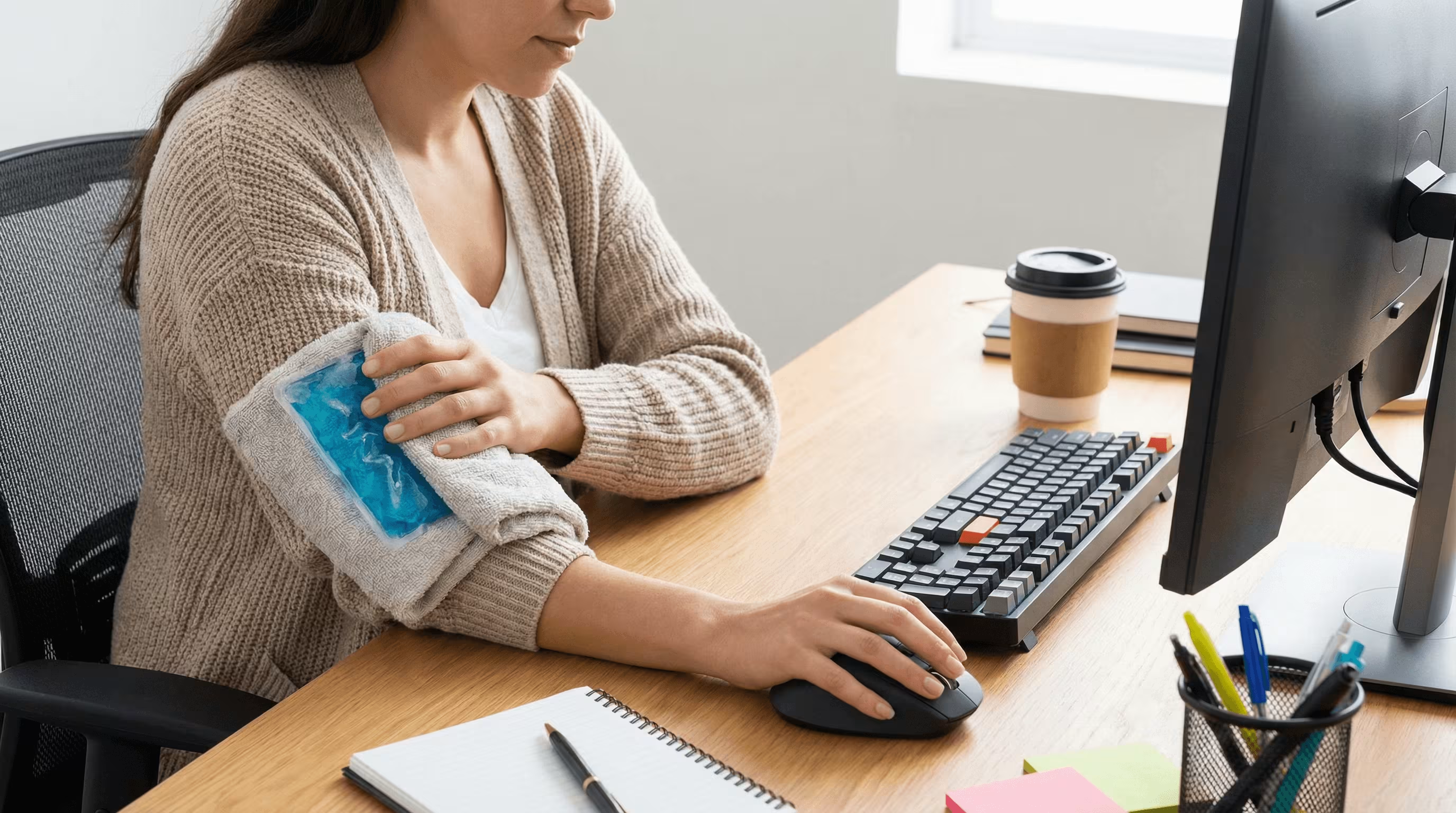
Schnelle Maßnahmen beruhigen Symptome, damit du weiterarbeiten kannst. Reduziere zunächst auslösende Bewegungen und ergänze dann einfache Selbsthilfe und sanfte Belastung, um die Belastbarkeit wieder aufzubauen.
Aktivität anpassen und pausieren: Dos & Don’ts
- Do: Mach alle 20–30 Minuten eine 30–60-sekündige Mikropause, schüttle die Hände aus und bring den Blutfluss zurück.
- Do: Wechsle Aufgaben – drei Minuten mit Tastaturkürzeln schlagen 300 zusätzliche Mausbewegungen.
- Don’t: Nicht fest zupacken: Halte die Maus federleicht und „parke“ die Hand zwischen Aktionen.
- Don’t: Nicht durch stechenden Schmerz durchziehen – das ist dein Signal zu pausieren oder die Position zu ändern.
Einfache Selbsthilfe: Kälte, Wärme und kurzfristige Unterstützung
Bei einem akuten Schub: Kühle die Ellbogenaußenseite 10–15 Minuten nach intensiver Nutzung, um Reizung zu beruhigen. Nutze sanfte Wärme vor Arbeitseinheiten, um Gewebe zu entspannen. Verzichte auf Handballenauflagen, die auf Sehnen drücken, und lehne Ellbogen nicht auf harten Armlehnen ab – polstere Kontaktpunkte oder ändere den Winkel. Ein weicher Unterarm-Sleeve oder Kinesiologie-Tape kann kurzfristig angenehmer sein, aber sie sind Brücken, keine Dauerlösung.
Sanfte Mobilität und sehnenaufbauende Übungen
Exzentrisches Training stärkt die Sehne. Probiere 1–2 Mal täglich: Halte eine leichte Kurzhantel (0,5–1,5 kg / 1–3 lb). Hebe das Handgelenk mit der anderen Hand in Extension an und senke dann langsam über 4–5 Sekunden ab. 2–3 Sätze à 8–12 Wiederholungen. Wiederhole das für die Handgelenksbeugung. Ergänze alle 30 Minuten 30-sekündige Handgelenksdehnungen in beide Richtungen. Für Augen und Nervensystem: Nutze die 20-20-20-Regel – alle 20 Minuten 20 Sekunden auf 20 Fuß (ca. 6 Meter) Entfernung schauen – um Gesamtspannung zu senken und Bewegung zu fördern.
Ergonomisches Setup, um Ellbogenbelastung zu reduzieren
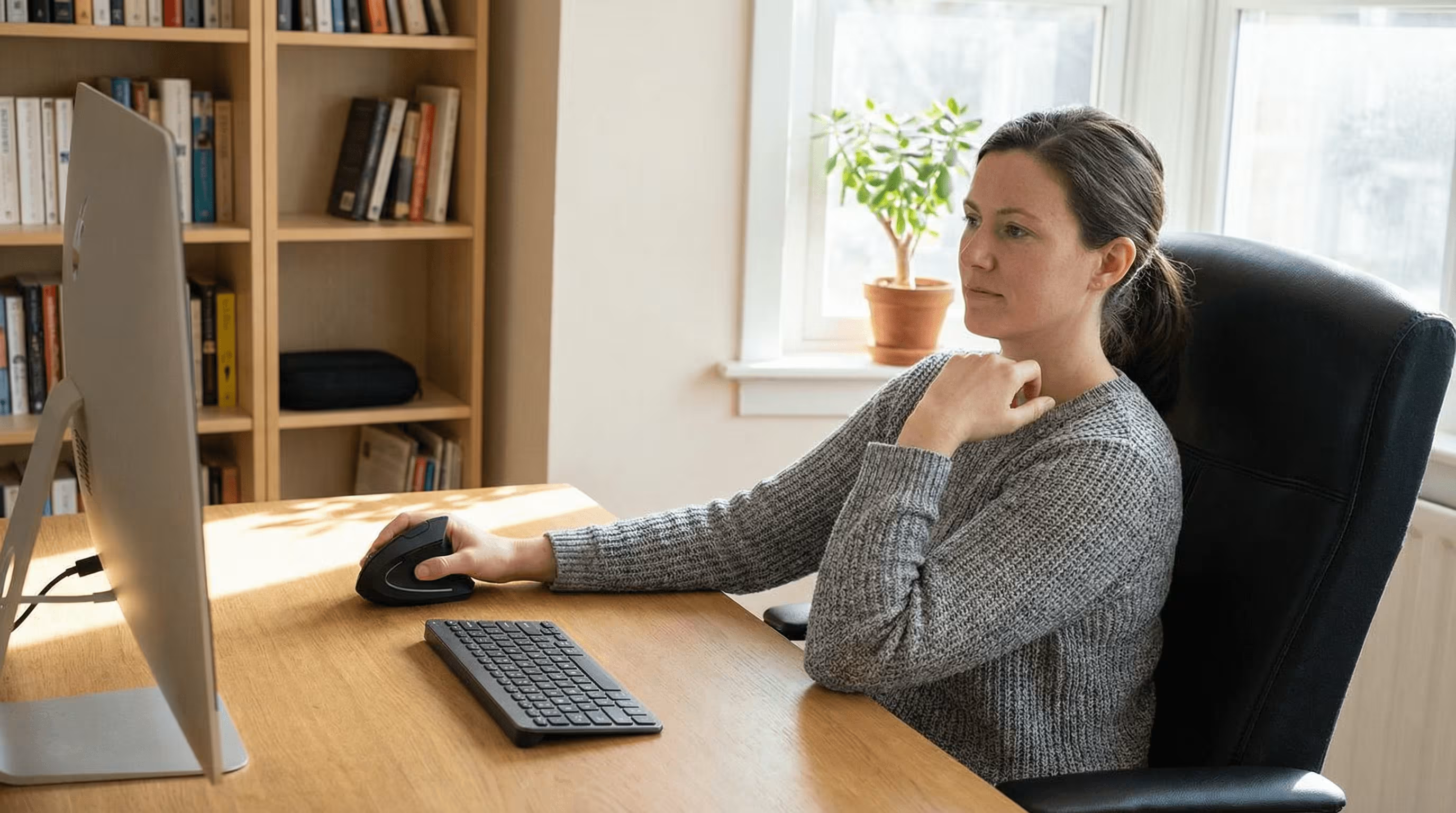
Weniger Reichweite, weniger Belastung. Bring Eingabegeräte näher ran, richte die Schultern aus und lass die Ellbogen etwa in einem 90-Grad-Winkel neben deinem Körper ruhen.
Zentrierte Mausführung und minimale Reichweite
Platziere das Zeigegerät auf derselben Höhe wie die Tastatur – direkt vor dir oder sehr nah an der Hand, mit möglichst wenig seitlicher Bewegung. Zentrierte Steuerung reduziert Schulterabduktion und Handgelenksabweichung, was die Last am lateralen Epicondylus senkt. Wenn du am Laptop arbeitest: Bildschirm auf Augenhöhe anheben und ein externes Eingabe-Set nutzen, damit die Ellbogen nah am Körper bleiben.
Zeigergeschwindigkeit, Klickkraft und Schulterausrichtung
Erhöhe die Zeigergeschwindigkeit, damit kleinere Handgelenksbewegungen den Cursor über den Bildschirm bringen – so reduzierst du Gesamtweg und Klickanzahl. Senke, wenn möglich, die Klickkraft in Softwareeinstellungen und nutze leichtgängige Tasten. Schultern auf gleicher Höhe, Ellbogen nah am Körper, Unterarme parallel zur Tischplatte. Wenn der Cursor „zappelig“ wirkt, senke die Sensitivität einen Schritt, statt wieder großflächig zu greifen.
Tastatur, Armlehnen und Schreibtisch-Geometrie
Stelle die Tastatur gerade vor deinen Oberkörper, mit leicht negativer Neigung, falls verfügbar. Ziel: Ellbogen 90–100 Grad, Handgelenke nahe neutral. Wähle eine Stuhlhöhe, bei der die Füße flach auf dem Boden stehen und die Knie etwa 90 Grad haben. Nutze gepolsterte Armlehnen nur leicht zur Unterstützung der Unterarme – ohne Druck auf die Ellbogenspitze. Eine kompakte Tastatur verkleinert den Abstand zum Zeigegerät: weniger Reichweite, entspanntere Sehnen.
Smartere Tools und Arbeitsgewohnheiten

Tools, die zu dir passen, machen gesunde Gewohnheiten leicht. Contour Devices® entwickelt ergonomische Mäuse und zentrierte Controller, die Reichweite, Griffkraft und Wiederholung reduzieren – die drei Haupttreiber hinter Ellbogenschmerzen durch Mausnutzung.
Leichtes Greifen, verstellbare Geräte und zentrierte Controller
- RollerMouse: ein zentrierter Controller direkt unter der Leertaste. Du steuerst den Cursor mit leichtem Touch über eine schmale Rollerbar – ohne Greifen, Verdrehen oder weites Heranreichen. Weniger Bewegung, weniger Belastung, mehr Komfort den ganzen Tag.
- SliderMouse Pro: touchpad-ähnliche Steuerung mit minimalistischer Rollerbar – ideal, wenn du gleitende Eingaben und klare Linien magst. Nah platzieren: Ellbogen nah am Körper: ausgerichtet bleiben.
- UniMouse: eine verstellbare ergonomische Maus, bei der sich Winkel und Daumenauflage flexibel anpassen lassen. Stell Pronation und Neigung so ein, dass du den Ellbogen entlastest und Gewebe über den Tag variierst.
- Balance Keyboard: ein kompaktes Layout, das das Zeigegerät näher heranholt. Die kürzere Reichweite schützt den Ellbogen, das niedrige Profil hält die Handgelenke neutral.
Wähle unterschiedliche Handballenauflagen und ergänze Zubehör nach Bedarf. Robuste Verarbeitung, recycelte Materialien und reparaturfreundliches Design bedeuten: besser für dich und besser für den Planeten. Contour Devices. Work miracles.
Shortcuts, Handwechsel und Mikropausen
Lege häufige Aktionen auf Tastaturkürzel, um repetitive Klicks zu reduzieren. Wechsle regelmäßig die Hand und nutze die nicht-dominante Seite für weniger präzise Aufgaben wie Scrollen oder Navigation. Stell dir alle 30 Minuten eine Bewegungserinnerung und steh kurz auf, dehne die Handgelenke und rolle die Schultern. Kleine Pausen summieren sich – und bringen bis zum Nachmittag spürbare Erleichterung.
Nachhaltigkeit und langfristige Belastbarkeit
Dein Ziel sind belastbare Gewebe – nicht nur „weniger Schmerz heute“. Integriere Ausdauerbewegung in die Woche, um die Sehnengesundheit zu unterstützen. Behalte ein paar exzentrische Sätze bei, selbst wenn die Beschwerden abklingen. Wähle langlebige Geräte und ein Setup, das du dauerhaft durchhältst: zentrierte Steuerung, kompakte Tastatur und eine neutrale Haltung, zu der du auch an vollen Tagen zurückfindest.
Wann professionelle Hilfe sinnvoll ist
Die meisten milden Fälle verbessern sich innerhalb von 2–6 Wochen mit Setup-Änderungen und progressiver Belastung. Wenn es trotz dieser Schritte immer wieder aufflammt, hol dir Unterstützung.
Behandlungswege und evidenzbasierte Therapien
Physiotherapeut*innen starten häufig mit dosiertem Belastungsaufbau (exzentrisch und isometrisch), manueller Therapie am Unterarm und Coaching zum richtigen „Pacing“. Kurze NSAID-Phasen können bei Symptomspitzen helfen; bei starken Schüben werden manchmal Kortikosteroid-Injektionen eingesetzt, auch wenn der Nutzen kurzfristig sein kann. Neuere Optionen wie Stoßwellentherapie zeigen gemischte Evidenz. Anhaltende oder atypische Verläufe können Bildgebung nötig machen, um Teilrisse oder Nerveneinengungen auszuschließen. Bitte um einen Plan, der Belastbarkeit aufbaut – nicht nur um Ruhe.
Lösungen auf Arbeitsplatzebene für Teams
Auf Teamebene lohnt sich die Investition in kompakte Tastaturen, zentrierte Zeigegeräte, verstellbare Stühle und Sitz-Steh-Optionen. Biete Arbeitsplatz-Checks für neue Mitarbeitende und nach Rollenwechseln an. Fördere Rhythmus: Mikropausen, Aufgabenrotation und Shortcut-Training. Weniger Ausfalltage, stabilere Leistung, gesündere Menschen – alle gewinnen.
Fazit
Wenn Ellbogenschmerzen durch Mausnutzung dir am späten Nachmittag den Fokus rauben, ändere die Variablen, die du kontrollieren kannst: weniger Reichweite, lockerer greifen, weniger Wiederholungen. Zentriere dein Zeigegerät, hebe den Bildschirm an und halte die Ellbogen nah am Körper. Ergänze tägliche exzentrische Übungen und kurze Bewegungspausen. Wenn deine Tools zu deinem Körper passen – denk an RollerMouse, SliderMouse Pro, UniMouse und das Balance Keyboard – bekommst du zentrierte Kontrolle, maximale Entlastung und Momentum, dem du vertrauen kannst. So schützt du deine Hände, dein Handwerk und die Arbeit, auf die du stolz bist.
Wichtigste Erkenntnisse
- Ellbogenschmerzen durch Mausnutzung entstehen meist durch überlastete Strecksehnen am lateralen Epicondylus, verursacht durch zu große Reichweite, festes Greifen und Wiederholungen – also Reichweite reduzieren, Griff lockern und Klicks reduzieren.
- Achte auf punktgenaue Druckschmerzen außen am Ellbogen, Unterarmschmerz, Morgensteifigkeit oder schwächeren Griff, und suche Hilfe, wenn Symptome länger als zwei Wochen bestehen, den Schlaf stören oder Taubheit bzw. Schwellung dazukommt.
- Nutze schnelle Linderung: 30–60 Sekunden Mikropausen alle 20–30 Minuten, mehr Shortcuts, nicht durch stechenden Schmerz „durchdrücken“, Kälte nach intensiver Nutzung und sanfte Wärme vor Sessions.
- Baue Kapazität mit täglichem Sehnentraining auf: langsame exzentrische Handgelenksextensionen und -flexionen (2–3 Sätze à 8–12 Wdh. mit 1–3 lb), 30-sekündige Handgelenksdehnungen und die 20-20-20-Regel für mehr Bewegung.
- Optimiere Ergonomie schnell: Zeigegerät zentrieren, kompakte Tastatur nutzen, Ellbogen nahe 90 Grad und Handgelenke neutral, Zeigergeschwindigkeit erhöhen, Klickkraft reduzieren und Schultern auf gleicher Höhe halten.
- Ziehe leicht zu greifende, zentrierte Tools wie RollerMouse, SliderMouse Pro, UniMouse und Balance Keyboard in Betracht, wechsle die Hand und hol dir professionelle Anleitung, wenn die Beschwerden trotz dieser Schritte immer wieder aufflammen.
Häufig gestellte Fragen
Was verursacht Ellbogenschmerzen durch Mausnutzung?
Ellbogenschmerzen durch Mausnutzung sind typischerweise eine Sehnenüberlastung am lateralen Epicondylus (Tennisellenbogen). Wiederholtes Zeigen, Klicken und ein fester Griff reizen die Strecksehnen von Handgelenk und Fingern. Zu große Reichweite, ungünstige Handgelenkswinkel und tausende Klicks sensibilisieren das Gewebe, reduzieren die Sehnenkapazität und können die Griffkraft vorübergehend schwächen.
Wie richte ich meinen Arbeitsplatz ein, um Ellbogenschmerzen durch Mausnutzung zu reduzieren?
Bring die Maus nah an die Tastatur und auf die gleiche Höhe, halte die Ellbogen nah am Körper (etwa 90 Grad) und die Handgelenke neutral. Erhöhe die Zeigergeschwindigkeit, um den Bewegungsweg zu verkleinern, nutze leichte Klicks und erwäge eine kompakte Tastatur, um die Reichweite zu minimieren. Leicht gepolsterte Armlehnen und die passende Stuhlhöhe helfen ebenfalls.
Welche schnellen Schritte helfen heute bei Ellbogenschmerzen durch Mausnutzung?
Mach alle 20–30 Minuten 30–60 Sekunden Mikropause, wechsle öfter zu Shortcuts und greife die Maus federleicht. Kühle die Ellbogenaußenseite nach intensiver Nutzung, nutze sanfte Wärme vor Sessions. Starte mit einfachen exzentrischen Handgelenksübungen und kurzen Dehnungen. Vermeide es, dich auf harte Kanten zu stützen oder Druck auf die Ellbogenspitze zu geben.
Wann sollte ich wegen mausbedingter Ellbogenschmerzen eine Ärztin/einen Arzt aufsuchen?
Suche Hilfe, wenn die Schmerzen länger als zwei Wochen anhalten, dich nachts wecken oder trotz Anpassungen alltägliche Aufgaben einschränken. Plötzliche Schwellung, sichtbare Fehlstellung oder zunehmende Taubheit (besonders Ring- und Kleinfinger) sollten zeitnah abgeklärt werden, um z. B. ein Kubitaltunnelsyndrom oder Teilrisse auszuschließen.
Wie lange dauert die Heilung eines Tennisellenbogens durch Computerarbeit?
Milde Fälle bessern sich häufig innerhalb von 2–6 Wochen mit Aktivitätsanpassung, ergonomischen Änderungen und progressivem Belastungsaufbau (exzentrisch und isometrisch). Die Erholung hängt von Arbeitslast und Konsequenz ab. Halte Belastungen unterhalb der Schmerzgrenze, vermeide kräftiges Greifen und baue Kapazität schrittweise auf. Anhaltende oder zunehmende Beschwerden sollten durch Physiotherapie oder ärztlich abgeklärt werden.
Welche Maus ist am besten bei Ellbogenschmerzen – vertikal, Trackball oder zentrierte Geräte?
Wähle Optionen, die Reichweite, Griffkraft und Wiederholung reduzieren. Zentrierte Controller minimieren Schulterabduktion und Handgelenksabweichung. Vertikale Mäuse können die Pronation im Unterarm verringern, erfordern aber oft weiterhin Reichweite; Trackballs reduzieren Bewegung, können jedoch den Daumen belasten. Kombiniere jedes Gerät mit einer kompakten Tastatur und leichten Klick-Einstellungen für das beste Ergebnis.
