

Computer Elbow Pain: Why Your Elbow Hurts At The Computer And How To Fix It

It’s mid-afternoon, your code has just compiled successfully, and then it strikes again—that sharp pain on the outer side of your elbow as you reach for your mouse. If computer elbow pain is constantly breaking your concentration, you’re not alone, and most importantly, there are solutions. By implementing a few strategic adjustments and utilizing ergonomic tools, you can safeguard your elbow, maintain your productivity, and power through extended work sessions pain-free. And if the ache comes with numbness in your ring and little fingers, the cause may be ulnar nerve entrapment rather than a tendon problem.
What Computer Elbow Pain Is (And Isn’t)

Computer elbow pain usually means lateral epicondylitis, "tennis elbow", but triggered by work, not sport. The tendons that anchor your wrist extensor muscles to the outside of the elbow get irritated from repeated small loads. It's overuse, not a single accident. And it's common in developers, designers, editors, accountants, anyone who lives on a keyboard and mouse.
Here's the helpful distinction: this isn't about one dramatic lift. It's the thousand tiny movements, click, scroll, reach, that add up. When those tendons get overloaded, the body protests with tenderness at the bony outside of the elbow, aching that can radiate down the forearm, and pain with gripping or wrist extension. Some days it's a dull burn. Other days it flares when you lift your coffee mug.
If you searched "elbow pain computer" at 11 p.m., you likely recognized the pattern. The good news: most cases respond to early, sensible changes and a more ergonomic setup. Clinical sources note that conservative care works for many people (Tennis elbow, NHS, 2024: Lateral Epicondylitis, StatPearls/NCBI Bookshelf, 2023).
Why It Happens At The Computer: Mechanics And Risk Factors

The key driver is load on the wrist extensor tendons while you grip, reach, and stabilize the mouse. Over hours, that load irritates the tendon attachment at the elbow. Poor desk setup magnifies it: a mouse parked far to the side, a desk that's too high, armrests that don't support your forearms, or a chair that forces you to shrug.
Think through a typical day. You angle your right arm out to the side to clear a big keyboard. Your forearm floats in space, so the elbow becomes the hinge that takes the strain. You scroll, you drag, you click, thousands of times, often with a tight grip and bent wrist. Add in long static postures and minimal breaks, and the tissue never gets a chance to recover.
Risk rises when:
- You overreach for the mouse (big shoulder abduction, elbow unsupported).
- Your keyboard sits too wide or high, pushing the mouse farther out.
- You use high click force or low pointer speed, requiring bigger movements.
- You work long hours without micro‑breaks.
Occupational health guidance backs this up: awkward reach and low forearm support increase musculoskeletal risk (NIOSH, Work‑Related MSDs, CDC, 2023). This is classic computer elbow pain mechanics, predictable and, importantly, modifiable.
Immediate Relief You Can Start Today

Dial down pain first so you can move better. Short, specific actions help:
- Rest the irritated tendon. Scale back the tasks that trigger pain, dragging, heavy clicking, long editing passes, just for now.
- Ice the outside of the elbow 15–20 minutes, 2–3 times daily, especially after work blocks.
- Consider over‑the‑counter NSAIDs if you tolerate them and your clinician agrees.
- Lighten your grip. Aim for a feather touch on the mouse and keys.
- Switch hands for simple tasks if you can. Even a few minutes per hour reduces cumulative load.
These quick wins calm the fire so the next steps, ergonomics and habit shifts, can actually stick. Most people with computer elbow pain notice a difference within days when they reduce provocation and add ice.
Ergonomic Setup That Protects Your Elbow
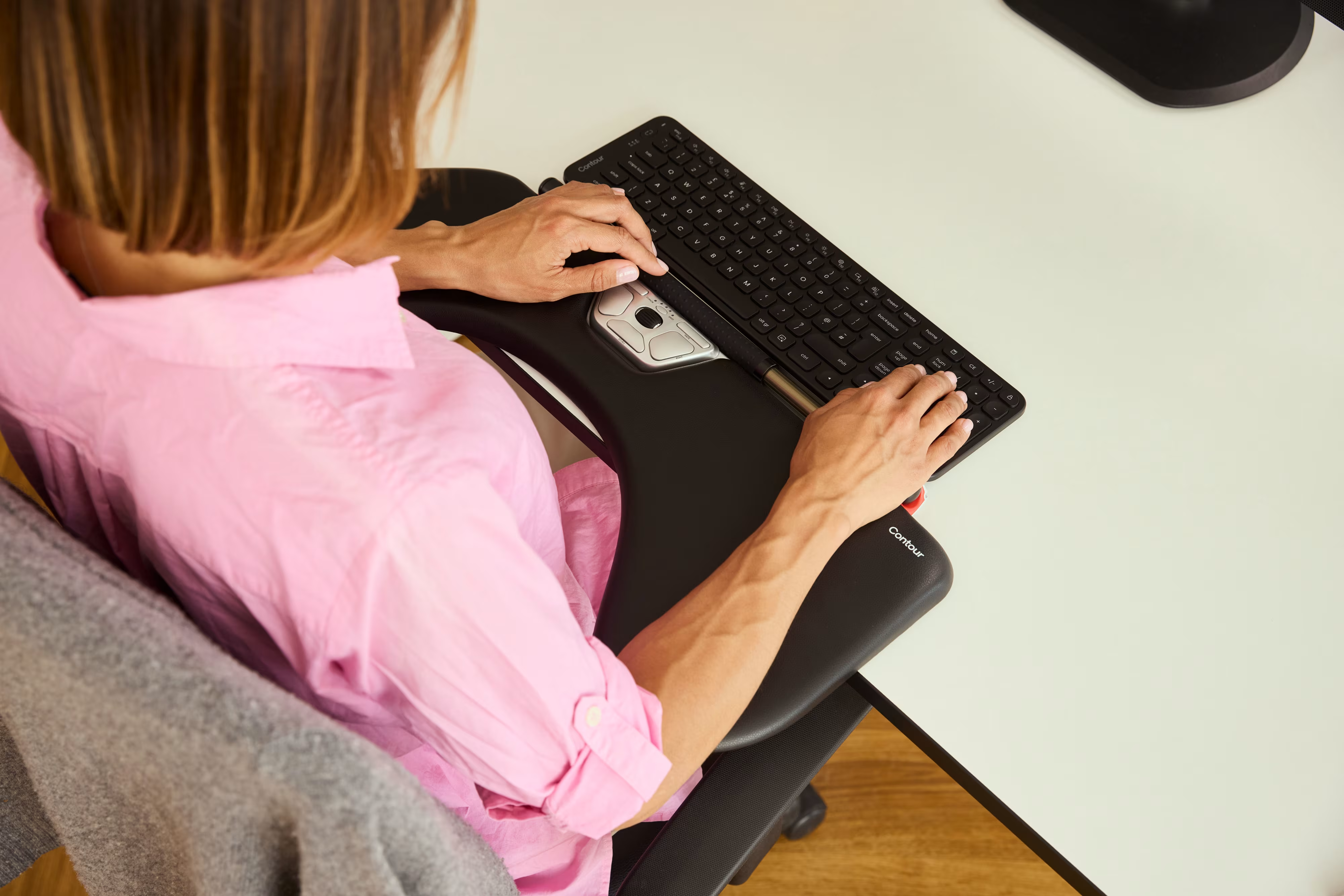
Set your station so your elbows feel supported, centered, and quiet. Small changes compound fast when you spend 6–10 hours a day here. For more detailed ergonomic workstation setup, read more about elbow support for desk.
Mouse And Input Device Positioning
Keep pointing centered and close. Place the mouse right next to the keyboard, not a forearm's length away. If you often knock into a number pad, use a compact keyboard so you can pull the mouse inward. Your wrist should stay straight, forearm supported, and shoulder relaxed. Choose a device that fits your hand, too large forces gripping: too small collapses your wrist.
Keyboard Height, Tilt, And Reach
Set the keyboard at or slightly below elbow height. Keep neutral wrists, no steep dorsal bend. A low front edge or slight negative tilt helps many people. Bring the keyboard close enough that your elbows stay near your sides. If your desk is high, drop the chair and add a footrest so you don't hike your shoulders.
Chair, Armrests, And Desk Height
Adjust your seat so your hips are level with or slightly above your knees. Raise or rotate armrests to lightly support the forearms without lifting the shoulders. If the desk is fixed and high, armrests become essential. Aim for elbows near 90 degrees with forearms supported so the elbow tendons aren't hanging in mid‑air taking the load.
Screen Placement And Posture Cues
Center the screen, top line at eye level. Sit tall through your sternum, relax your shoulders, and keep ears over shoulders, no forward crane. Every 20–30 minutes, scan your posture: Are your elbows tucked? Is the mouse still close? These tiny cues spare the tendons that drive computer elbow pain.
Work Habits And Tools That Lower Load

Technique plus tools beat pain. You'll feel the payoff in fewer flares, steadier focus, and more energy left at day's end.
Micro-Breaks And Stretching Routine
Front‑load recovery. Every 30–60 minutes, pause for 30–60 seconds. Open and close your hands, rotate your wrists, and gently stretch the forearm extensors: elbow straight, palm down, bend the wrist toward the floor with the other hand until you feel a mild pull, not pain. Repeat 2–3 times. Sprinkle in movement, stand, shift, walk to fill your water. Short breaks outperform one giant stretch session.
Shortcuts, Sensitivity, And Cursor Speed
Reduce motion, reduce strain. Increase pointer sensitivity so you cover the screen with small, relaxed movements. Lower click force in device settings if available. Learn a handful of high‑impact shortcuts, copy, paste, find, switch apps, to cut drag‑and‑drop marathons. For editors and coders, map frequent actions to nearby keys or device buttons. Less reach, less gripping, less computer elbow pain.
Low-Force, Centered, And Adjustable Input Options
Devices can move the needle quickly when they reduce reach and force. Centered pointing keeps both hands in front of you, so there's no side reach that tugs on the elbow.
- RollerMouse: A minimalist Rollerbar placed directly in front of your keyboard lets you control the pointer with small, neutral movements, no reaching, twisting, or gripping. It's a strong option if computer elbow pain spikes when you mouse to the side.
- SliderMouse Pro: Touchpad‑like, centered control with customizable buttons for frequent tasks. Great if you prefer gliding gestures with both hands.
- UniMouse: An adjustable vertical mouse that changes angle and thumb support on the fly. Finding your neutral is easier when the mouse adapts to you.
- Balance Keyboard: A compact layout that shortens the reach to your pointing device, with a low front edge that supports neutral wrists.
Choose the setup that fits your work: long edit timelines, dense spreadsheets, or all‑day coding. Contour Devices® builds for alignment and low force with clean, durable materials, good for your hands and built to last. Contour Devices. Work miracles.
When To Seek Medical Care
Check in with a clinician if computer elbow pain persists beyond a few weeks even though adjustments, if it worsens, or if it limits daily tasks like lifting a kettle or typing. Early evaluation speeds recovery and helps confirm the diagnosis. Most cases are manageable without invasive care, but timely guidance prevents small issues becoming chronic. Reliable overviews note that many cases improve with conservative care in weeks to months (NHS, 2024: StatPearls, 2023).
Red Flags And Recovery Timelines
Red flags need prompt evaluation: numbness or tingling into the hand, marked swelling, heat, fever, night pain that wakes you, or notable loss of grip strength. These may indicate nerve involvement, a different tendon issue, or another condition that mimics computer elbow pain.
Typical recovery: with rest, ergonomic changes, and targeted exercise, many people feel better within 6–12 weeks, though tendon remodeling can take several months. Progress rarely moves in a straight line, expect a few flare days. Use those as feedback: reduce provoking tasks, review your setup, and return to the basics, support the forearms, center your reach, and keep movements small and easy.
Evidence-Based Treatments To Discuss
If symptoms linger, talk to your clinician or a physical therapist. Helpful options include:
- Guided exercise: progressive loading for wrist extensors and shoulder stabilizers. Stronger tissue tolerates more work. Physical therapy also addresses posture and pacing.
- Bracing: a counterforce forearm strap or wrist support can offload the tendon during tasks that trigger computer elbow pain.
- Modalities: ice and, in some settings, shockwave therapy may be considered for stubborn cases (evidence varies by protocol).
- Injections: corticosteroid may reduce short‑term pain but can have mixed long‑term outcomes: platelet‑rich plasma is a consideration for refractory cases, discuss risks and benefits (Lateral Epicondylitis, StatPearls/NCBI Bookshelf, 2023: Clinical updates summarized in BMJ reviews, 2021–2023).
- Surgery: rarely needed and reserved for persistent, disabling pain after months of conservative care.
These decisions are personal and should fit your goals, job demands, and timelines. This article offers general information: your clinician provides medical advice.
Further reading: Tennis elbow, NHS, 2024: Work‑Related Musculoskeletal Disorders, NIOSH/CDC, 2023: Lateral Epicondylitis, StatPearls/NCBI Bookshelf, 2023.
Conclusion
You deserve long, focused sessions without that elbow twinge. Center your reach, support your forearms, and shrink movements. Build micro‑breaks into your day. If your tools are fighting you, switch to options that lower force and bring control to the center, like a RollerMouse paired with a Balance Keyboard or an adjustable UniMouse. Most computer elbow pain eases with these changes, and the earlier you act, the faster you return to steady, pain‑free work. Start with one change today. Feel the difference by Friday.

Key Takeaways
- Computer elbow pain is usually tendon overuse from thousands of small mouse and keyboard moves, and it’s highly modifiable with better setup and habits.
- Get quick relief by resting triggers, icing 15–20 minutes 2–3 times daily, using a feather‑light grip, switching hands for simple tasks, and considering OTC NSAIDs if appropriate.
- Protect your elbow with centered, close pointing; a compact keyboard at or slightly below elbow height; supported forearms and relaxed shoulders; and periodic posture checks.
- Lower daily load with micro‑breaks every 30–60 minutes, gentle forearm extensor stretches, higher pointer sensitivity, smart shortcuts, and low‑force, centered tools like a RollerMouse, SliderMouse Pro, UniMouse, or a Balance Keyboard.
- Seek care if computer elbow pain persists beyond a few weeks, worsens, or shows red flags (numbness, swelling, night pain); most cases improve in 6–12 weeks with conservative care, PT‑guided loading, and occasional bracing, while surgery is rarely needed.
Frequently Asked Questions
What is computer elbow pain and how is it different from an injury?
Computer elbow pain typically refers to lateral epicondylitis (tennis elbow) caused by repetitive, low‑load tasks like mousing and typing—not a single incident. It presents as tenderness on the outer elbow, aching into the forearm, and pain with gripping or wrist extension. It’s an overuse condition common in intensive computer work.
How should I set up my workstation to reduce computer elbow pain?
Keep the mouse close to a compact keyboard to avoid side reach, set the keyboard at or slightly below elbow height, and lightly support forearms with armrests. Maintain neutral wrists, relaxed shoulders, and elbows near your sides. Center the screen and perform quick posture checks every 20–30 minutes.
What immediate relief steps help computer elbow pain during the workweek?
Scale back provoking tasks, ice the outer elbow 15–20 minutes 2–3 times daily, and consider OTC NSAIDs if appropriate. Lighten your mouse and keyboard grip, switch hands for simple tasks, and add micro‑breaks every 30–60 minutes. Many people notice improvement within days when load is reduced and icing is consistent.
When should I see a clinician for computer elbow pain, and how long does recovery take?
Seek care if pain persists beyond a few weeks despite adjustments, worsens, or limits daily tasks. Red flags include numbness, marked swelling, fever, night pain, or notable grip weakness. With ergonomic changes and targeted exercise, many improve in 6–12 weeks, though tendon remodeling can take several months.
Are vertical or centered mice better for tennis elbow from computer use?
Devices that reduce reach and grip force are helpful. Centered pointing devices (e.g., roller‑bar or touchpad‑like options) keep both hands in front, minimizing side reach. Adjustable vertical mice can promote a more neutral wrist and lighter grip. Choose the style that lets you move with small, relaxed, supported motions.
Is a standing desk or heat enough to fix computer elbow pain?
A standing desk alone won’t solve it if your reach and forearm support are poor. Prioritize close mouse placement, supported forearms, neutral wrists, micro‑breaks, and gradual strengthening. For flares, ice is typically better to calm irritation; gentle heat may help stiffness but shouldn’t replace load reduction and ergonomics.
