

Brace for Cubital Tunnel Syndrome: Relief, Fit, and Smart Use for Desk Workers

Reaching for a brace for cubital tunnel syndrome after a long coding sprint? You rub your ring finger, shake your hand, and notice the warm ache along your inner elbow. The cursor drifts, your elbow stays bent, and that familiar tingling returns just as the deadline heats up. Here's how to calm the nerve, choose the right support, and set up your workstation so you can work longer, without the flare‑ups.
What Cubital Tunnel Syndrome Is and Why It Flares at the Desk

The ulnar nerve runs through a narrow space at the inside of your elbow (the "funny bone" area). When it's squeezed or irritated, you can feel numbness and tingling in the ring and little fingers, forearm ache, and sometimes loss of grip. Long sessions in front of a screen tend to provoke symptoms because you keep your elbows flexed, you rest on the elbow point, or you hold one position for hours.
What you notice at 3:15 p.m.: your elbow is tucked and bent past 90°, your palm hovers over the mouse, and your shoulder creeps forward. That sustained bend tightens the tunnel and reduces blood flow to the nerve. Leaning on the elbow adds pressure. Over days or weeks, irritation builds.
OrthoInfo (American Academy of Orthopaedic Surgeons, 2023) describes ulnar nerve compression at the elbow as a common cause of small‑finger numbness and recommends activity modification and night splinting early. BMJ Best Practice (Ulnar neuropathy at the elbow, 2024) notes symptoms worsen with prolonged elbow flexion. Cleveland Clinic (Cubital Tunnel Syndrome, 2022) adds that leaning on elbows and repetitive motion increase risk.
How a Cubital Tunnel Syndrome Brace Works
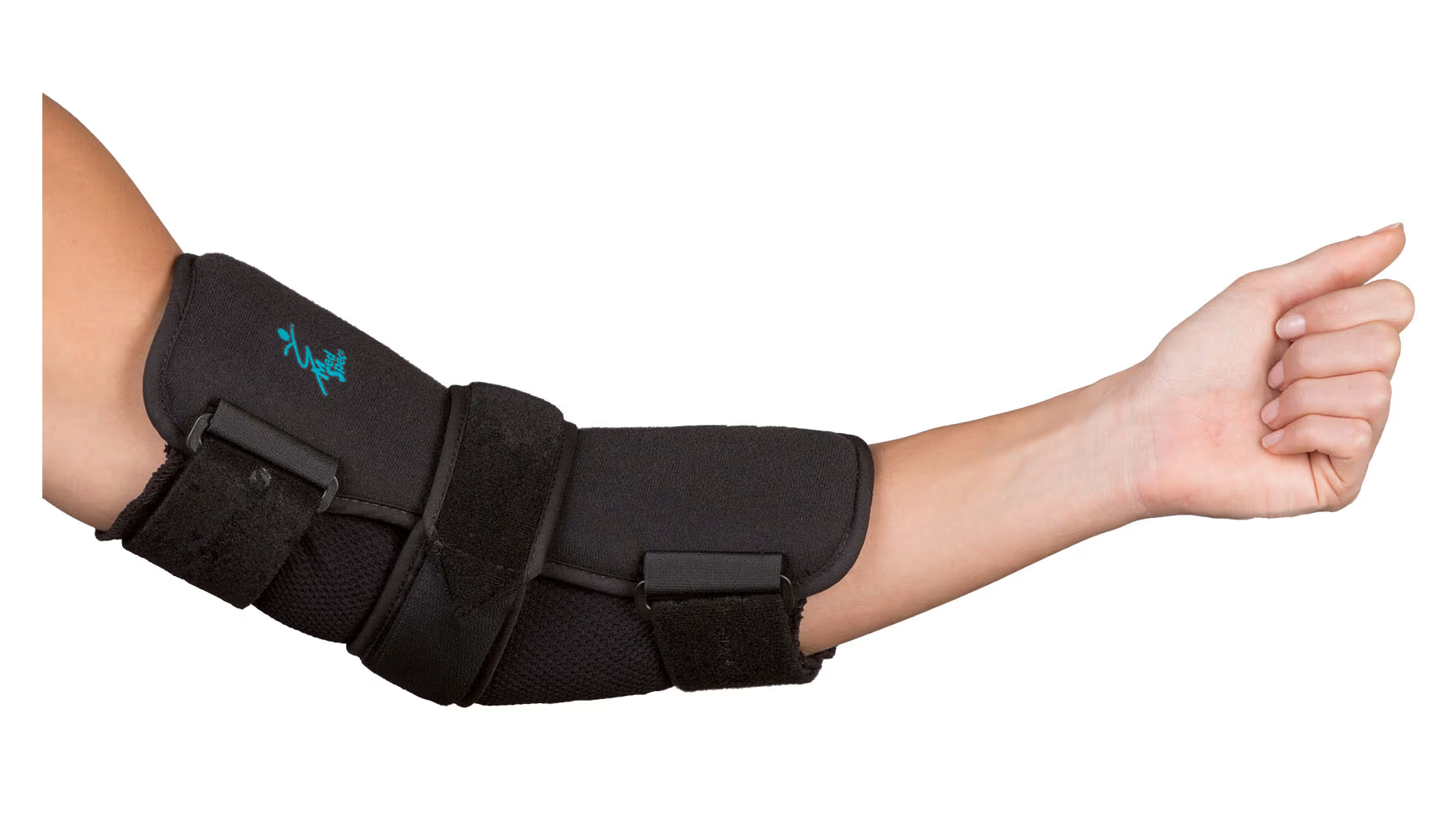
A brace for cubital tunnel syndrome holds your elbow in a slightly extended or neutral angle, often around 30–45° of flexion. That position widens the tunnel and reduces strain when you type, scroll, or sleep. By physically preventing deep bends and discouraging direct pressure on the inner elbow, the brace cuts down repetitive irritation. Most people start at night, when unconsciously curling the arm under a pillow can spike symptoms, and add daytime wear during known aggravators: long meetings, editing sessions, or intensive mousing.
Choosing the Right Cubital Tunnel Syndrome Brace
Types of Braces and Splints
- Rigid splints: Great for night use. They prevent deep bending when you sleep curled on your side. Choose models with padded inner elbows and adjustable straps.
- Flexible sleeves/wraps: Useful during work hours. They allow light movement while reminding you not to over‑bend or lean.
Fit and Sizing: Finding Stable, Neutral Support
- Aim for neutral: The cubital tunnel syndrome brace should stabilize around 30–45° of elbow flexion. Too bent defeats the purpose: too straight can feel restrictive.
- Snug, not tight: You shouldn't feel pins and needles from the brace itself. If tingling increases, loosen a strap or resize.
- Try tasks: Test your regular work, typing, shortcut keys, track changes, while wearing it. You should maintain control without fighting the brace.
Materials, Breathability, and Sustainability
- Choose soft, breathable liners to reduce sweat and skin irritation during long sessions.
- Look for hypoallergenic fabrics and smooth seams at the inner elbow crease.
- Prefer durable materials that last through months of nightly use. Fewer replacements are better for you and the planet
How to Wear Your Brace at Work and While You Sleep
Key point: Start at night, add targeted daytime wear, and integrate with an ergonomic desk to reduce triggers.
Set‑Up and Wearing Schedule
- Start at night for 7–14 days. Most people notice less morning tingling within two weeks.
- Add daytime wear during tasks that cause symptoms: long video edits, spreadsheet marathons, or code reviews.
- Ramp up gradually: 1–2 hours on, then off, so your skin and arm tolerate the cubital tunnel syndrome brace.
Workstation Integration: Keyboard, Mouse, and Arm Support
- Keep elbows near 90°. If your desk is high, raise your chair and use a footrest, or lower the desk.
- Support, don't lean: Use chair armrests lightly to float the forearms rather than jamming the elbow tip into the pad.
- Shorten your reach: A compact keyboard brings the mouse closer and reduces elbow bend.
Where Contour devices help:
- Centered pointing: A RollerMouse keeps your hands close to center, no reaching, less elbow flexion. Try the RollerMouse Red for precise, low‑effort control across multiple displays.
- Touchpad‑style control: SliderMouse Pro offers fluid, ambidextrous pointing right in front of the keyboard, again minimizing elbow bend.
- Adjustable angles: UniMouse lets you change vertical angle and thumb support to keep wrists straight and shoulders relaxed.
- Compact typing: Pair your setup with the Balance Keyboard to reduce lateral reach to the pointer and keep the elbows neutral.
Skin Care, Comfort Tweaks, and Troubleshooting
- Check daily: Redness that lasts over 20 minutes after removal means loosen or refit.
- Use a moisture‑wicking sleeve if you sweat during long sessions.
- If the brace causes new tingling or cold fingers, it's too tight or too straight. Adjust until symptoms settle.
Beyond Bracing: Complementary Care and When to Seek Help

Exercises and Activity Modification
- Gentle ulnar nerve glides can reduce sensitivity, ideally taught by a physical or hand therapist. Do them without forcing end‑range.
- Avoid direct elbow pressure. Pad desk edges. Don't drive or phone with elbows jammed on armrests.
- Switch sides for light tasks. Use more keyboard shortcuts. Keep wrists straight to reduce upstream strain at the elbow.
Medication, Injections, and When Surgery Is Considered
- Short courses of NSAIDs can help pain and swelling. Discuss with your clinician.
- Some clinicians use corticosteroid injections around the nerve sheath: responses vary.
- If you develop hand weakness, dropping objects, or muscle wasting at the thumb web (first dorsal interosseous), seek specialist care. Nerve conduction studies can guide decisions. Surgery (ulnar nerve decompression or transposition) is considered when conservative care fails or nerve damage progresses, as outlined by OrthoInfo (AAOS, 2023) and Cleveland Clinic (2022).
Workplace Ergonomics to Reduce Ulnar Nerve Strain Long Term
Key point: A smarter desk layout plus central pointing reduces elbow bend, pressure, and repetition, day after day.
Desk Layout: Height, Reach, and Neutral Elbows
- Set chair so your elbows fall near 90°, shoulders relaxed, forearms level. Float the elbow: don't press the tip into the armrest.
- Pull gear inward. Keep keyboard and pointer within a short reach so your upper arms stay close to your sides.
- Tilt the keyboard slightly negative (front edge lower) if your wrists extend while typing.
Pointing and Typing Strategies to Minimize Bend and Pressure
- Keep the mouse close, or better, centered. A RollerMouse or SliderMouse Pro places the pointer under your thumbs, directly in front of the spacebar. Less reach, less bend, less strain.
- Alternate hands when possible. Map common actions to both sides.
- Use a compact layout. The Balance Keyboard trims wasted width so your pointer sits close.
Breaks, Stretching, and Healthy Habits
- Micro‑breaks win: 30–60 seconds every 20–30 minutes. Uncurl the elbow, open the chest, and gently extend the arm.
- Heat in the morning, brief ice after heavy use, as tolerated.
- Sleep strategy: Wear your brace for cubital tunnel syndrome at night until morning symptoms settle, then taper to maintenance.
Conclusion
You want control back, steady hands, quiet nerves, and work that flows. A well‑chosen brace for cubital tunnel syndrome keeps the elbow neutral so the ulnar nerve can calm down. Pair it with a desk that brings work to you, centered pointing with RollerMouse or SliderMouse Pro, a compact Balance Keyboard, light arm support, and the daily spikes of tingling start to fade.
Start tonight: fit a comfortable cubital tunnel syndrome brace, stop leaning on your elbows, and pull your tools within easy reach. If symptoms persist or weakness appears, loop in a clinician early. Small changes add up. Less bend, less pressure, more relief, so you can stay comfortable, aligned, and in control of the work you love.
Key Takeaways
- A brace for cubital tunnel syndrome limits elbow flexion to about 30–45° and reduces pressure on the ulnar nerve, which often calms tingling and numbness.
- Choose a rigid splint for night and a flexible sleeve for daytime; fit should be snug, not tight, with breathable, hypoallergenic materials.
- Start nightly wear for 7–14 days, then add 1–2 hour daytime sessions during trigger tasks while testing typing and mouse control for comfort.
- Set up ergonomics to keep elbows near 90°: float forearms on armrests, bring keyboard and mouse close, and consider centered devices like RollerMouse or SliderMouse Pro.
- Protect skin and circulation: if redness lasts over 20 minutes or fingers tingle or feel cold, loosen or refit, and use a moisture‑wicking liner.
- Seek care if weakness, dropping objects, or muscle wasting appears; combine a cubital tunnel syndrome brace with activity changes, nerve glides, and clinician‑guided treatments.
Cubital Tunnel Syndrome Brace: FAQs
What does a brace for cubital tunnel syndrome do, and when should I wear it?
A brace for cubital tunnel syndrome limits deep elbow bending (often to 30–45°) and reduces pressure on the ulnar nerve. Start with nightly wear for 7–14 days, then add targeted daytime use during aggravating tasks like long meetings or intensive mousing. Adjust snug—not tight—to avoid tingling.
How do I choose the right cubital tunnel syndrome brace size and type?
Use a rigid splint at night to prevent deep flexion and a flexible sleeve or wrap by day to allow light movement. Fit the elbow near 30–45° flexion. It should be snug without causing numbness. Prioritize breathable, hypoallergenic liners, smooth seams, and test typical tasks while wearing it.
How do I set up my desk so a brace for cubital tunnel syndrome works better?
Keep elbows near 90°, shoulders relaxed, and forearms supported without leaning on the elbow tip. Pull keyboard and pointing device closer; a compact layout or centered pointing reduces reach. Take 30–60 second micro‑breaks every 20–30 minutes to uncurl the elbow and gently extend the arm.
How long until symptoms improve with a brace for cubital tunnel syndrome, and can it replace surgery?
Many notice less morning tingling within about 2 weeks; broader improvement often appears over 2–6 weeks with bracing plus activity changes. A brace is first‑line, not a guaranteed cure. Seek specialist care for weakness or persistent symptoms; surgery is considered if conservative treatment fails or nerve damage progresses.
Is cubital tunnel syndrome the same as carpal tunnel, and how can I tell the difference?
No. Cubital tunnel affects the ulnar nerve at the elbow, causing numbness in the ring and little fingers, often worse with elbow flexion or leaning. Carpal tunnel involves the median nerve at the wrist, typically affecting the thumb, index, and middle fingers, often aggravated by wrist flexion or repetitive gripping.
What exercises or self‑care complement wearing a cubital tunnel brace?
Do gentle ulnar nerve glides taught by a clinician, avoiding forced end‑range. Pad desk edges, avoid direct elbow pressure, alternate hands for light tasks, use more keyboard shortcuts, and keep wrists straight. Try heat in the morning and brief ice after heavy use. Seek care promptly if weakness appears.
